HubSpot and Salesforce can both connect marketing activity with CRM revenue, but they do it through very different attribution architectures. That difference affects what gets tracked, which records receive credit, and how much setup the marketing team needs.
HubSpot is generally easier for marketing-led attribution because interactions, contacts, deals, and revenue live in one reporting environment.
Salesforce gives enterprise teams more control over campaign and opportunity influence, but the result depends more heavily on campaign structure, contact roles, product configuration, and CRM governance.
This HubSpot vs. Salesforce attribution comparison focuses on attribution rather than the broader CRM debate. It looks at tracking architecture, models, revenue attribution, AI, setup, and post-sale measurement, with the wider B2B marketing attribution problem kept in view.
HubSpot vs. Salesforce attribution at a glance
| Direct answer: HubSpot is usually easier for marketer-led attribution because website interactions, contacts, deals, and revenue are connected inside one reporting environment. Salesforce is more configurable for opportunity-centric B2B attribution, but its output depends more heavily on campaigns, contact roles, connected marketing products, and administrative setup. |
| Area | HubSpot | Salesforce |
|---|---|---|
| Attribution center | Interaction + contact + deal | Campaign + contact role + opportunity |
| Website journey | Strong native tracking | Depends more on the connected marketing stack |
| Pre-contact context | Stronger native continuity | Less native in Sales Cloud alone |
| Revenue attribution | Deal revenue | Opportunity revenue |
| Multi-touch | Yes | Yes |
| Customization | Easier to operate | More flexible |
| Data-driven model | Empirical | Einstein Attribution |
| Setup | Simpler | More configurable |
| Best for | Marketing-led teams | Complex enterprise B2B |
| Main dependency | Clean contacts, interactions, deals | Campaigns, roles, opportunities, product setup |
Key takeaways
- HubSpot is easier to operate: Marketing interactions, contacts, deals, and revenue are closer together, so the attribution workflow is more marketer-friendly.
- Salesforce is more configurable: Customizable Campaign Influence and Einstein Attribution can fit complex enterprise opportunity structures.
- The data model is different: HubSpot is interaction/contact-led, while Salesforce Campaign Influence is campaign/opportunity-led.
- Revenue attribution has access requirements: In HubSpot, deal-create and deal-revenue attribution require Marketing Hub Enterprise.
- Neither CRM is product analytics: SaaS teams may still need behavioral data after signup to judge activation, retention, and customer quality.
- Closed Won is not the end: Retention, expansion, and LTV can change which source turns out to be the best acquisition channel.
How HubSpot attribution works
HubSpot’s attribution system starts from the customer journey around a contact. Its tracking code, marketing assets, CRM records, campaigns, and deals can all contribute interaction data that later appears in attribution reporting.
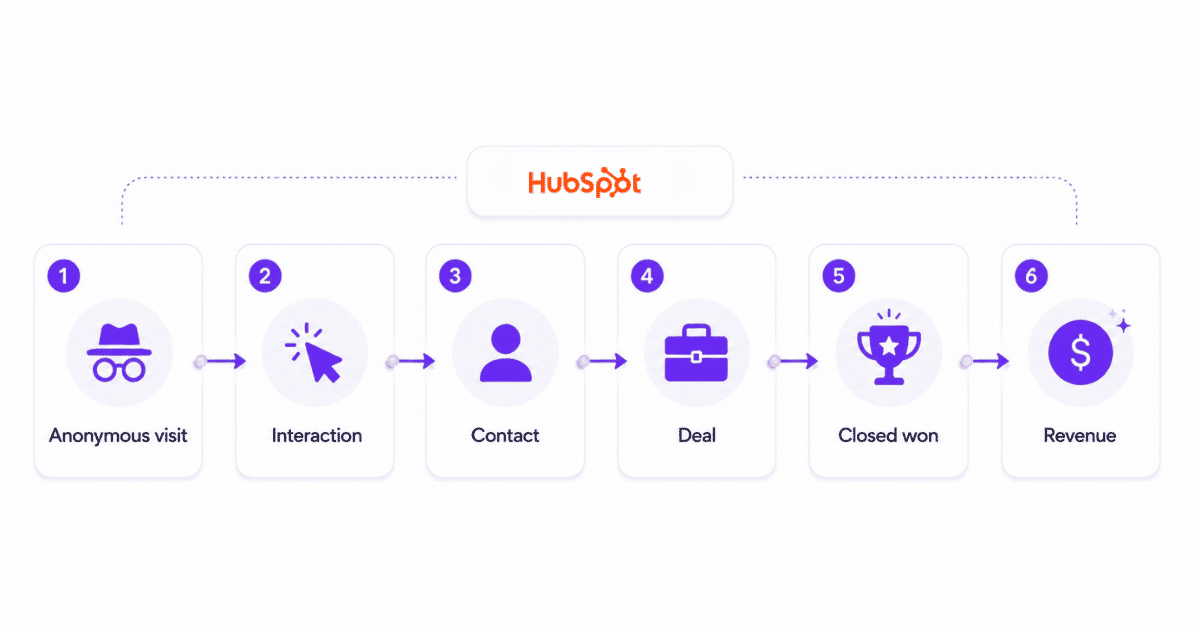
| HubSpot architecture: Anonymous visit -> interaction -> contact -> deal -> Closed Won -> revenue |
Attribution architecture
HubSpot is strongest when the marketing team wants to preserve digital interactions and then connect them with a known CRM record. A visitor can arrive from an ad or organic search, view pages, submit a form, become a contact, enter a deal, and eventually close.
This matters because attribution is not restricted to a Lead Source field. The reporting layer can evaluate the interactions that appeared before a contact, deal, or revenue outcome, provided the tracking and CRM relationships are clean.
What HubSpot can attribute
HubSpot attribution can use interactions such as website pages, ads, forms, marketing emails, social activity, calls, meetings, marketing events, and other tracked assets. Its current attribution reporting documentation separates reports by the conversion being measured.
- Contact Create Attribution: Which sources, assets, and interactions contributed to creating contacts.
- Deal Create Attribution: Which interactions contributed before a deal was created.
- Deal Revenue Attribution: Which interactions receive credit for revenue from Closed Won deals.
HubSpot attribution models
HubSpot’s current 2026 model set includes First Touch and Last Touch for single-touch analysis, plus the linear attribution model and time-decay attribution model for multi-touch credit.
The first-click attribution and last-click attribution guides explain the endpoint logic behind the first- and last-touch approaches.
Empirical is the major freshness point. HubSpot now uses historical interaction patterns to weight interaction types rather than relying only on a fixed position-based rule.
It replaces the older U-shaped, W-shaped, J-shaped, and Inverse J-shaped options in the current reporting workflow.
The existing guide to HubSpot revenue attribution goes deeper into how HubSpot applies touchpoint credit around deals and revenue.
Unlock insights that drive growth
Contact, deal, and revenue attribution
The three report types answer different funnel questions. Contact Create is the acquisition view. Deal Create moves the analysis into pipeline creation. Deal Revenue follows the journey to commercial value.
Access differs by tier. HubSpot documents attribution reporting on Marketing Hub Professional and Enterprise, but Deal Create and Deal Revenue attribution are Marketing Hub Enterprise capabilities. That distinction matters when a team is comparing CRM costs specifically for revenue measurement.
HubSpot limitations
HubSpot’s strength is the convenience of keeping marketing interactions and CRM outcomes close together, but that convenience still depends on data quality.
- Contacts and deals must be associated correctly for downstream attribution to make sense.
- The tracking code and campaign setup must capture the interactions the team expects to analyze.
- Advanced deal and revenue attribution requires Enterprise access.
- HubSpot can store behavioral data, but it is not primarily a product analytics platform for activation, feature adoption, retention, or cohort behavior.
How Salesforce attribution works
The first thing to clarify is that ‘Salesforce attribution’ is not one universal feature.
Salesforce has Campaign Influence in Sales Cloud, additional influence models for Account Engagement users, Einstein Attribution for eligible editions, and newer Opportunity Influence capabilities in parts of its marketing stack.
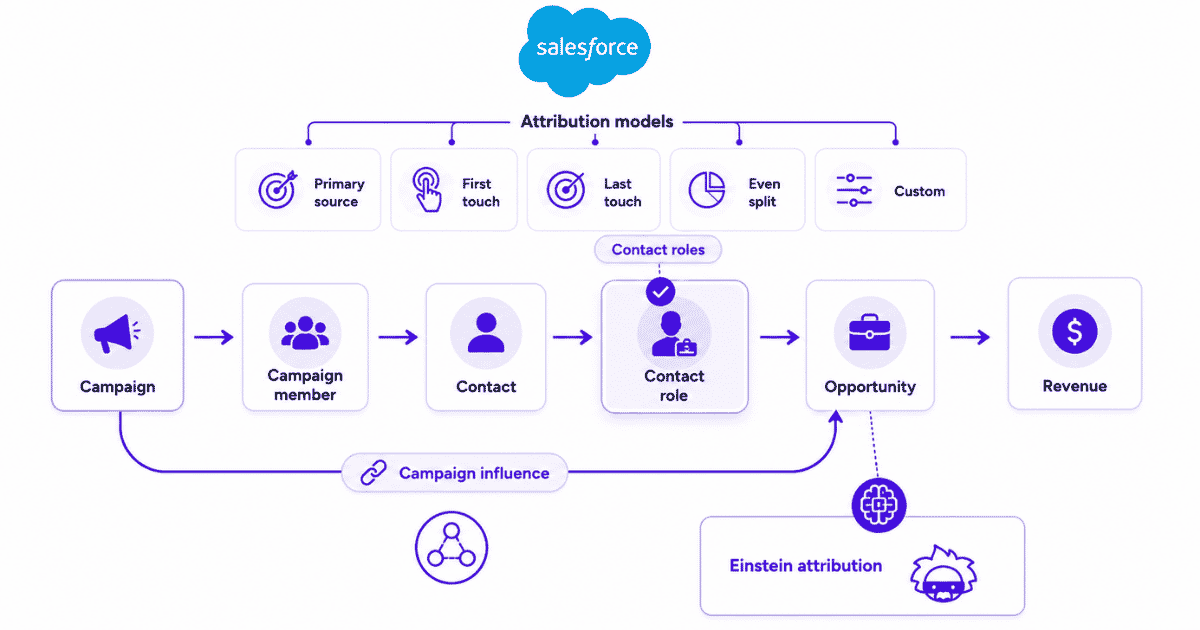
| Salesforce architecture: Campaign -> campaign member/contact -> contact role -> opportunity -> revenue |
Campaign Influence
Customizable Campaign Influence identifies which campaigns influenced opportunities and can assign revenue share through standard or custom models.
Its key relationship is different from HubSpot’s interaction-led structure. Salesforce scans active campaigns for members who are also assigned as contact roles on an open opportunity. That campaign-member-to-opportunity relationship becomes the basis for influence records.
Contact roles matter
This makes Opportunity Contact Roles a critical part of attribution quality. If the people involved in an opportunity are missing, campaign influence can understate the marketing activity that actually shaped the deal.
The same applies to campaign membership and campaign governance. Salesforce can be very flexible, but flexibility shifts more responsibility to the CRM structure and the people maintaining it.
Salesforce attribution models
The model set depends on the Salesforce products in use. The core Primary Campaign Source model assigns opportunity influence to the primary campaign. Customizable Campaign Influence can support business-specific percentages and manual or automated influence records.
For users of both Sales Cloud and Account Engagement, Salesforce offers First Touch, Last Touch, and Even Distribution. Even Distribution is a form of multi-touch attribution because several eligible campaigns can share credit.
Organizations can also create custom influence logic when standard models do not match the buying journey.
Einstein Attribution
Einstein Attribution adds a data-driven attribution layer on top of Campaign Influence. It analyzes historical campaign and opportunity patterns instead of relying only on a fixed position-based rule.
Its model is based on Shapley Value logic and is available for eligible Account Engagement Advanced and Premium customers with Enterprise, Performance, or Unlimited Salesforce editions. It also has setup prerequisites, including connected campaigns, Campaign Influence, and sufficient opportunity-contact-role data.
Opportunity Influence
Salesforce also has Opportunity Influence in its newer marketing stack. It evaluates opportunity contacts and engagement activity to create first-touch or last-touch revenue attribution records.
This is separate from Customizable Campaign Influence, so teams should verify which attribution product their Salesforce implementation actually uses before comparing capabilities.
That distinction is why broad claims such as ‘Salesforce has no web attribution’ are too simplistic. Sales Cloud Campaign Influence is CRM relationship-heavy, while Account Engagement and other Salesforce marketing products can add web and engagement data.
Salesforce limitations
- Attribution quality depends heavily on campaign structure, campaign membership, opportunity contact roles, and opportunity data.
- The exact model set changes according to Salesforce edition and connected marketing products.
- Einstein Attribution requires additional Account Engagement and Salesforce prerequisites.
- The system is highly configurable, but implementation and administration are usually more involved than a marketer-led HubSpot setup.
The dedicated Salesforce marketing attribution guide explains those Campaign Influence, opportunity, and revenue mechanics in more depth.
HubSpot vs. Salesforce attribution models
A model-by-model comparison is useful only if the edition caveat stays visible. The broader guide to marketing attribution models explains how these credit rules change the same recorded journey.
HubSpot exposes one current model set in its attribution workflow. Salesforce model availability varies with Campaign Influence, Account Engagement, Einstein, and custom configuration.
| Attribution need | HubSpot | Salesforce |
|---|---|---|
| First-touch credit | First Touch | First Touch for eligible Account Engagement setups; Primary Campaign Source is separate |
| Last-touch credit | Last Touch | Last Touch for eligible Account Engagement setups |
| Equal multi-touch | Linear | Even Distribution for eligible Account Engagement setups |
| Recency weighting | Time Decay | Custom logic or other product-specific configuration |
| Data-driven | Empirical | Einstein Attribution Data-Driven Model |
| Custom opportunity influence | Less admin-heavy | Strong through Customizable Campaign Influence |
| Revenue record | Deal | Opportunity |
Which CRM gives marketers better visibility?
Model support explains how credit is calculated. Visibility depends on what each CRM can observe and connect before that credit is assigned.
Website behavior
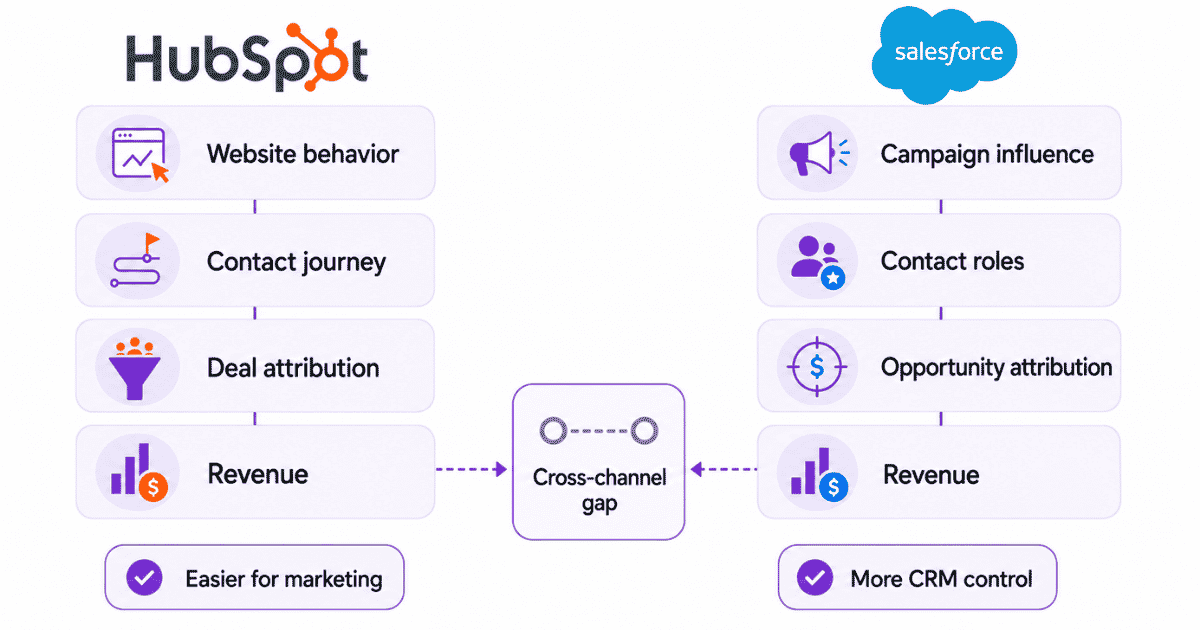
HubSpot has the clearer advantage for a marketing team that wants website interactions to flow naturally into contact and deal attribution. Its tracking code and marketing assets sit inside the same ecosystem as the CRM.
Salesforce can absolutely incorporate web and engagement data through Account Engagement and other marketing products, but Sales Cloud Campaign Influence by itself is more dependent on known campaign and CRM relationships.
Campaign influence
Salesforce is stronger when the organization thinks in terms of formal campaigns, buying committees, opportunity contact roles, and custom revenue influence. Complex enterprise teams can shape the attribution logic around the opportunity model they already use.
Revenue connection
Both platforms can connect marketing with revenue, but the commercial record is different. HubSpot attributes around deals. Salesforce attributes around opportunities and Campaign Influence records.
That is why the best choice often follows the system of record. If sales already operates deeply in Salesforce opportunities, replacing that structure simply to simplify attribution rarely makes sense.
Cross-channel analysis
Neither CRM automatically solves every cross-channel measurement problem. Growth teams often want ad spend, anonymous behavior, known-user behavior, pipeline, revenue, and post-sale quality in the same analysis.
That is a broader revenue attribution problem rather than a CRM-only reporting question.
Attribution maintenance
HubSpot generally asks less of the marketing team operationally. Salesforce offers more control, but that control comes with more dependence on CRM governance, campaign rules, contact roles, and product configuration.
Before changing the CRM or attribution model, an attribution checklist can expose missing campaign data, identity gaps, CRM relationship issues, or inconsistent revenue definitions.
Usermaven’s Measurement Trust Center checks campaign tracking, customer matching, connected platforms, conversion feedback, and data confidence before those signals shape attribution decisions.
HubSpot vs. Salesforce pricing for attribution
Pricing is easy to compare badly because the two platforms package attribution differently. The useful comparison is the access level required for the attribution question you need to answer.
HubSpot currently lists Marketing Hub Professional at $800 per month with annual commitment or $890 on monthly billing, plus required onboarding. Enterprise starts at $3,600 per month. Deal Create and Deal Revenue attribution require Marketing Hub Enterprise.
Salesforce is more stack-dependent. Customizable Campaign Influence is available in several Sales Cloud editions, while Account Engagement models, Einstein Attribution, B2B Marketing Analytics, and Opportunity Influence depend on additional products and editions.
| Attribution requirement | HubSpot | Salesforce |
|---|---|---|
| Lead/contact attribution | Professional or Enterprise | Campaign and CRM setup dependent |
| Deal/opportunity attribution | Enterprise for Deal Create | Campaign Influence / opportunity configuration |
| Revenue attribution | Enterprise for Deal Revenue | Opportunity + Campaign Influence |
| Data-driven attribution | Empirical | Einstein Attribution on eligible stack |
| Custom influence logic | Limited relative to Salesforce | Strong |
| Pricing style | Published Marketing Hub tiers | Stack and edition dependent |
The practical lesson is simple: do not compare HubSpot Starter with a Salesforce list price and call it an attribution comparison. Compare the product combination required to answer your actual revenue question.
If neither native CRM setup covers the full journey, compare dedicated revenue attribution tools by the commercial record they connect to marketing, not by feature count alone.
Where HubSpot attribution is stronger
- Marketing-led setup: Marketing teams can work with attribution without relying as heavily on CRM administrators.
- Website interactions: Digital behavior is naturally connected with the same environment that stores contacts and deals.
- Faster reporting: Standard attribution reports are easier to launch and explain to non-technical stakeholders.
- Unified CRM context: Contacts, campaigns, lifecycle stages, deals, and revenue are already part of the same operating system.
- Lower admin burden: Fewer custom campaign-influence rules are required for common marketing questions.
HubSpot’s strength is not unlimited attribution flexibility. It is making marketing and CRM data easier to use together.
Where Salesforce attribution is stronger
- Opportunity structure: Salesforce is built for complex B2B revenue processes centered on opportunities.
- Buying committees: Contact roles and account relationships fit multi-stakeholder sales motions.
- Custom influence: Teams can build business-specific campaign influence models and percentages.
- Enterprise CRM logic: Custom objects, stages, fields, automation, and governance can shape the measurement model.
- Data-driven attribution: Einstein Attribution can model campaign contribution using historical opportunity data.
Salesforce becomes stronger as attribution needs become more tightly connected to custom enterprise opportunity architecture.
Where both CRM attribution setups can leave gaps
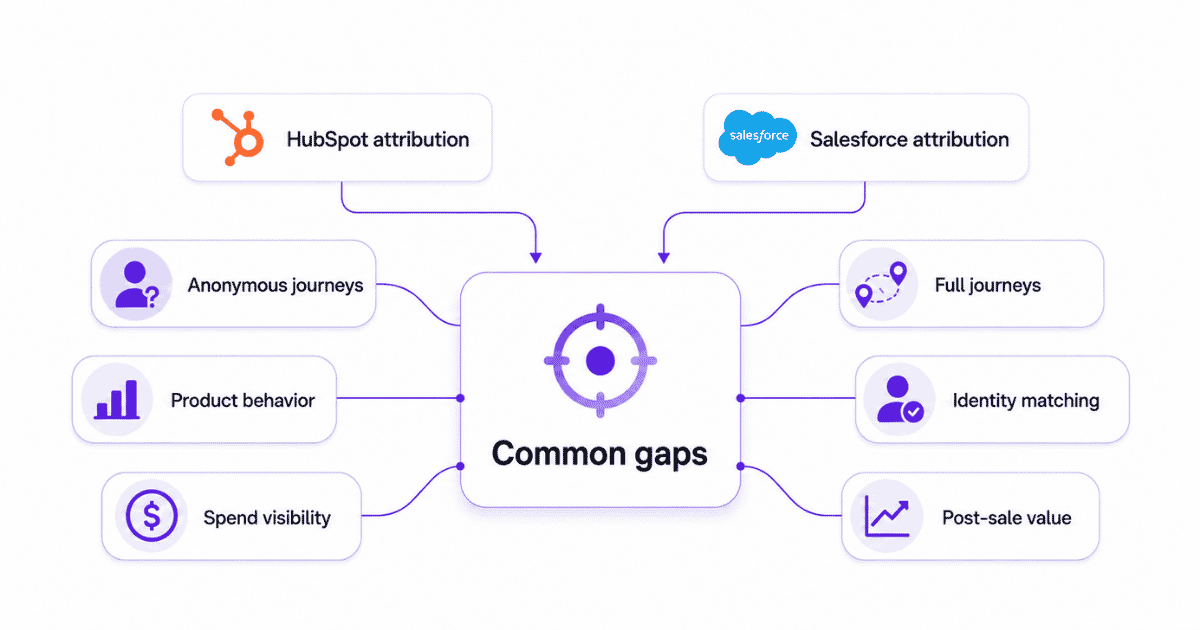
Choosing the stronger native CRM attribution system does not mean every customer-journey question is solved. The gaps become more visible for SaaS, PLG, and multi-channel teams.
Pre-identification journeys
Marketing journeys often start before the CRM record exists. Anonymous visits, content consumption, repeat sessions, and cross-channel returns can influence the later deal or opportunity.
HubSpot preserves more of this context natively when its tracking layer is in place. In Salesforce, the answer depends more heavily on which marketing products and identity systems are connected.
Product behavior
Neither CRM is fundamentally a product analytics system. SaaS teams may still need to know which campaigns create users who activate, adopt key features, upgrade, retain, or expand.
Cross-channel spend
Campaign influence can show which marketing activity participated in revenue, but budget allocation also needs cost. The useful chain is spend -> journey -> pipeline -> revenue -> CAC, not campaign credit in isolation.
Customer journeys
CRM timelines are valuable, but they do not always preserve the complete behavioral path across sessions and product activity. Dedicated customer journeys make the sequence behind an attributed outcome easier to inspect.
At an aggregate level, conversion path analysis helps compare the recurring sequences that appear before deals, opportunities, and revenue.
Identity resolution
Attribution becomes more useful once anonymous behavior can be connected with a known lead, contact, customer, or account. Contacts Hub provides the person-and-company layer for joining that behavior with downstream CRM context.
Post-sale value
The CRM may record the sale accurately and still leave a growth team with another question: did the acquired customer activate, retain, expand, and become economically valuable over time?
Use one attribution layer with either CRM
Choosing HubSpot or Salesforce does not have to determine the analytics layer used to evaluate acquisition. Usermaven can keep the CRM as the system of record while connecting earlier website and product behavior with later pipeline and revenue outcomes.
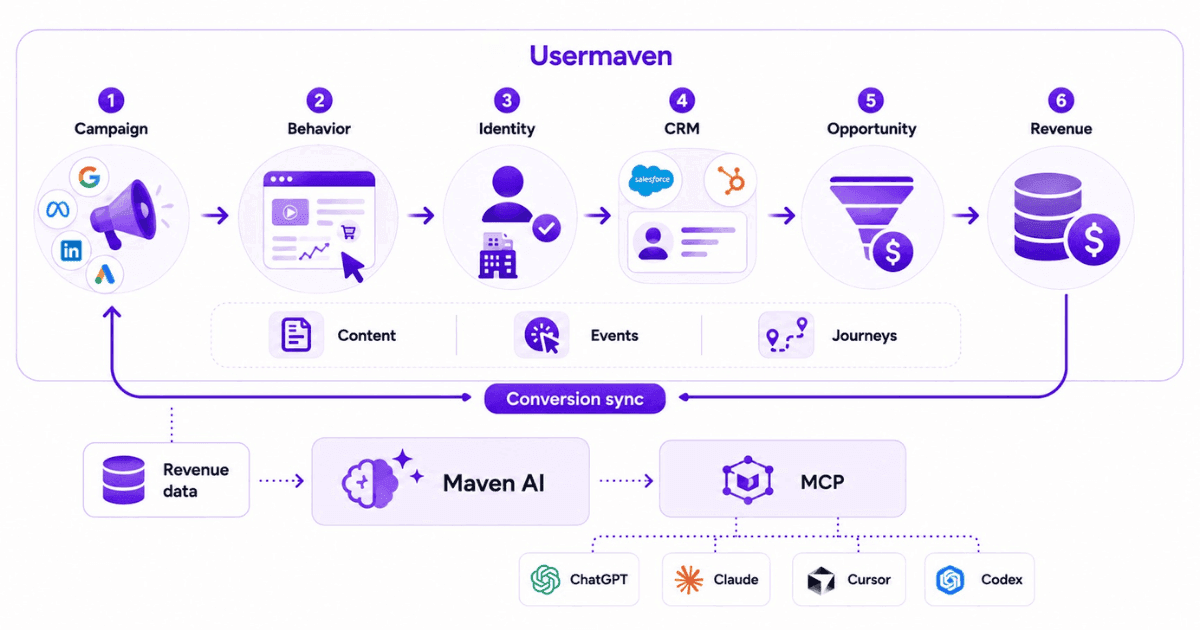
| Common measurement chain: Campaign -> website/product behavior -> identified contact -> CRM -> pipeline -> revenue |
Usermaven with HubSpot
The HubSpot + Usermaven integration adds behavioral and attribution context around HubSpot contacts, companies, deals, lifecycle stages, engagements, pipeline, and revenue.
The important point is that HubSpot remains the CRM. Usermaven adds the earlier acquisition and behavioral evidence around that CRM record, then lets teams evaluate outcomes such as lead quality, opportunity rate, win rate, revenue, activation, and retention.
Usermaven can also use Reverse ETL separately to send selected audiences and attributes back to HubSpot, so analysis can feed the workflows where marketing and sales already operate.
Usermaven with Salesforce
The current Salesforce integration works by enriching behavior Usermaven is already collecting. Usermaven reads CRM data such as contacts, accounts, opportunities, and deal information, then matches it with tracked people, commonly through email.
That produces a different view from Campaign Influence alone. A team can inspect what happened before the CRM record, what the user did on the website or product, and which opportunity or revenue event eventually followed.
See Usermaven in action
Book a free demo and discover how powerful analytics can grow your business.
Compare the same journey
Whether revenue ultimately lives in a HubSpot deal or a Salesforce opportunity, the marketing question is the same: which source introduced the customer, which interactions moved the journey forward, and which campaigns consistently create qualified revenue?
This CRM-independent layer is especially useful when an organization changes CRM, runs different CRMs across business units, or wants marketing attribution rules that do not change simply because the sales system of record changes.
How AI changes CRM attribution analysis
AI matters here only when it changes how attribution is analyzed or acted on. Generic content-generation features do not help decide whether HubSpot or Salesforce gives better revenue measurement.
HubSpot AI
HubSpot supports AI-assisted reporting through Breeze AI. That can speed up exploratory analysis, but it sits beside the dedicated attribution workflow rather than replacing HubSpot’s attribution models and report builders.
HubSpot also has a remote MCP Server that gives compatible AI clients permission-aware read and write access to CRM objects such as contacts, companies, deals, subscriptions, and segments.
Salesforce Einstein
Einstein Attribution is directly relevant to attribution. It analyzes historical campaign and opportunity data to calculate campaign contribution instead of requiring only a fixed first-, last-, or even-distribution rule.
Salesforce now also provides Hosted MCP Servers so authorized AI clients can interact with Salesforce data and automation under the user’s existing governance and permissions.
Maven AI
Maven AI can analyze attribution alongside website behavior, product activity, funnels, journeys, retention, conversions, and revenue. That wider context changes the questions a growth team can ask.
- Which channels create the most qualified opportunities?
- Which campaigns generate customers who actually activate?
- Which acquisition sources produce retained or high-value accounts?
- What happened before a Closed Won deal or opportunity?
MCP
Usermaven MCP operates at the analytics layer rather than only the CRM record layer. It can read website analytics, product analytics, attribution, funnels, journeys, retention, segments, dashboards, and reports.
With supported write permissions, AI can create or update funnels, segments, journeys, retention reports, dashboards, and attribution views after explicit approval.
The practical difference is scope: HubSpot MCP is centered on HubSpot CRM objects, Salesforce MCP on governed Salesforce data and automation, and Usermaven MCP on the cross-channel behavioral and attribution workspace around either CRM.
Real-world evidence from B2B attribution
Hyperengage is a useful example because its problem was not choosing the wrong CRM. The B2B SaaS team was reconciling website analytics, CRM data, platform dashboards, and manual tracking that told different stories.
In the Hyperengage case study, the B2B SaaS team needed to understand which channels actually contributed to qualified pipeline across long, multi-touch journeys.
Hyperengage: from fragmented reports to qualified pipeline
| Evidence | Result | Why it matters |
|---|---|---|
| Attribution coverage | 4 -> 6 channels | More of the B2B journey became measurable |
| New sources uncovered | 2 | Previously hidden acquisition contribution surfaced |
| Organic first-touch conversions | 0 -> 8 | An undercredited demand source became visible |
| Visitor-to-goal conversion | 22.19% | Acquisition was connected with a downstream goal |
| Budget decision | More focus on qualified-pipeline sources | Attribution changed actual spend allocation |
The lesson is directly relevant to a HubSpot vs. Salesforce attribution decision. A CRM can store the downstream commercial record correctly while the earlier customer journey remains fragmented across analytics, ad platforms, and other systems.
Hyperengage used the fuller journey to reduce dependence on last-click thinking, recognize channels that opened the journey, and put more budget behind sources connected with qualified pipeline. That is a stronger standard for attribution than asking which CRM produced the prettier campaign report.
Does attribution stop at Closed Won?
CRM attribution naturally gravitates toward the moment a deal or opportunity closes. For a recurring-revenue business, that is important but incomplete.
| Post-sale measurement: Campaign -> customer -> retention -> expansion -> LTV |
HubSpot
HubSpot’s native attribution framework is centered on contact creation, deal creation, and deal revenue. That makes it useful for measuring the funnel through Closed Won, especially when Marketing Hub Enterprise is already part of the stack.
Salesforce
Salesforce Campaign Influence and Einstein Attribution are centered on campaigns, opportunities, pipeline, and opportunity revenue. The system can support renewal or custom milestones through broader Salesforce configuration, but the core attribution model is still opportunity-oriented.
Usermaven
Usermaven can extend the acquisition question into product behavior, retention, lifecycle, expansion, and LTV analysis. That is especially useful for SaaS teams where the highest-value source may not be the source with the cheapest lead or fastest Closed Won.
For consistent definitions, the guide to calculating SaaS LTV explains how long-term customer value can be calculated and compared.
The practical decision is whether marketing should optimize to the first commercial conversion or to durable customer economics. If two sources create the same number of Closed Won customers but one cohort retains and expands better, revenue attribution should eventually reflect that quality difference.
How to choose between HubSpot and Salesforce
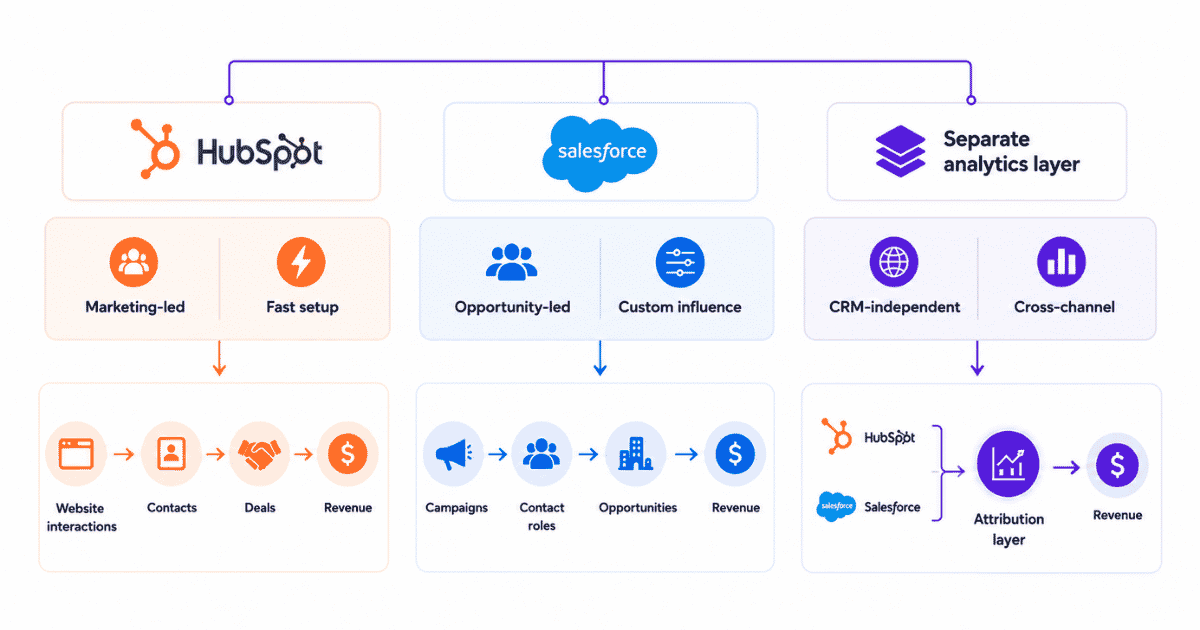
The decision becomes easier when it is framed around the attribution architecture rather than the size or popularity of the CRM.
- Choose HubSpot when: Marketing owns attribution and faster setup matters more than custom opportunity influence.
- Choose HubSpot when: Website interactions, forms, marketing assets, contacts, deals, and revenue should live close together.
- Choose Salesforce when: Opportunity structure, buying committees, contact roles, and custom CRM logic dominate the revenue process.
- Choose Salesforce when: Campaign Influence or Einstein Attribution already fits a mature Account Engagement and Sales Cloud stack.
- Use another analytics layer when: The same attribution logic should work regardless of whether revenue lives in a HubSpot deal or Salesforce opportunity.
- Add product analytics when: Customer quality is determined by activation, feature adoption, upgrade behavior, or retention after signup.
- Add LTV measurement when: Closed Won is only the first step in customer economics.
HubSpot vs. Salesforce: Final verdict
HubSpot is the stronger native choice for teams that value marketer-friendly setup, website interaction context, and a unified contact-to-deal reporting workflow. Its limitation is not a lack of attribution, but that the deepest deal and revenue reporting requires Enterprise access.
Salesforce is the stronger native choice for organizations with complex opportunity architecture, buying committees, formal Campaign Influence requirements, and the admin resources to maintain them. Its flexibility is real, but so is its dependence on CRM structure and product configuration.
For teams that want the same behavioral and attribution logic regardless of whether revenue ultimately lives in a HubSpot deal or Salesforce opportunity, Usermaven can connect acquisition, website and product behavior, CRM pipeline, revenue, retention, and LTV in one measurement layer.
Ready to see Usermaven in action? Explore the platform or book a demo for a closer look.
FAQs
1. Is HubSpot or Salesforce better for attribution?
HubSpot is generally easier for marketing-led attribution because interactions, contacts, deals, and revenue live in one reporting environment. Salesforce is more configurable for opportunity attribution and complex CRM structures.
2. How does HubSpot attribution work?
HubSpot assigns credit to tracked interactions before a contact, deal, or revenue conversion. Depending on the report and subscription, teams can analyze Contact Create, Deal Create, or Deal Revenue attribution.
3. How does Salesforce attribution work?
Salesforce commonly uses Campaign Influence to connect campaigns with opportunity contacts and revenue. Eligible setups can add First Touch, Last Touch, Even Distribution, custom influence, and Einstein Attribution.
4. What attribution models does HubSpot use?
HubSpot’s current models are First Touch, Last Touch, Linear, Time Decay, and Empirical. Empirical replaced several older position-based options and uses historical conversion-path patterns to weight interactions.
5. What attribution models does Salesforce use?
Salesforce model availability depends on the product setup. Options can include Primary Campaign Source, First Touch, Last Touch, Even Distribution, custom influence models, and Einstein Attribution.
6. Does HubSpot have revenue attribution?
Yes. HubSpot supports Deal Revenue Attribution for Closed Won revenue. HubSpot currently documents Deal Create and Deal Revenue attribution as Marketing Hub Enterprise capabilities.
7. Does Salesforce support multi-touch attribution?
Updated

Written by
Junaid Ahmed
Content Writer & Digital Marketer
Junaid Ahmed is a content and copywriter with 3+ years of experience creating research-driven content across SaaS, B2B, ecommerce, and digital marketing. He specializes in turning complex topics into clear, practical content that helps marketers better understand their challenges, evaluate solutions, and make informed decisions. His work spans educational content, industry insights, and actionable marketing guides.
All articles by Junaid →