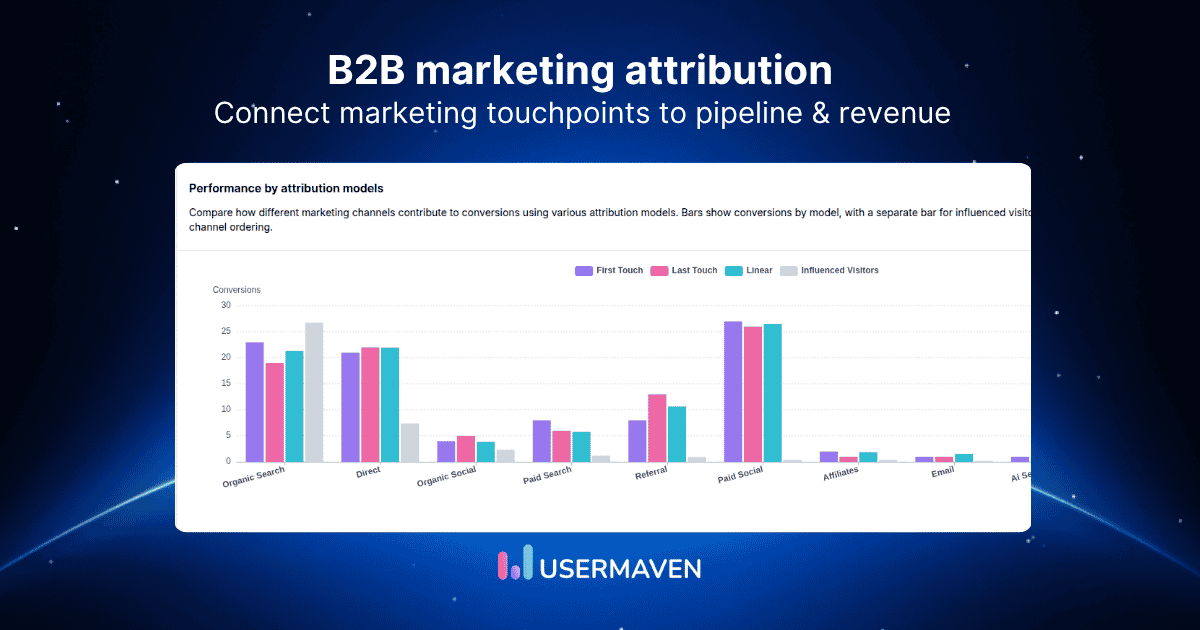
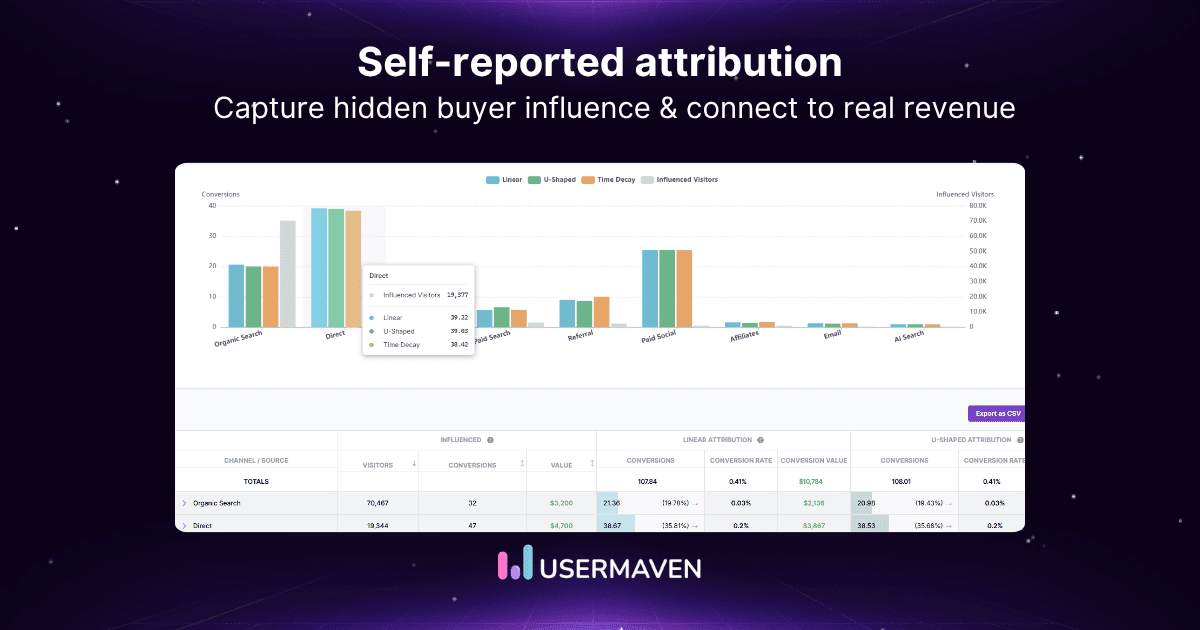
A single conversion. Three marketing channels. And somehow, each report tells a different story.
Someone clicks your Google ad, returns through organic search, and converts after another paid search interaction. Which campaign actually deserves the credit?

Paid search attribution helps you understand how PPC campaigns contribute to conversions throughout the customer journey, rather than judging performance by the final click alone.
This guide covers how paid search attribution works, the main marketing attribution models, and how to measure the impact of your campaigns on conversions and revenue.
Maximize your ROI
with accurate attribution
Key takeaways
- Paid search attribution helps you understand how paid search campaigns contribute to conversions, leads, and revenue.
- Different attribution models assign credit differently. First-touch, last-touch, and multi-touch attribution can produce different views of the same customer journey.
- Conversion tracking is the foundation. Accurate attribution depends on correctly configured conversion events, campaign tracking, and reliable customer data.
- Google Ads attribution reporting doesn’t tell the entire cross-channel story. Customers may interact with organic search, email, and other channels before converting.
- Better attribution supports smarter budget decisions. Looking beyond clicks and conversions helps you evaluate which paid search campaigns contribute to valuable business outcomes.
What is paid search attribution?
Paid search attribution is the process of assigning credit to paid search advertising interactions that contribute to a conversion. It helps marketers understand how campaigns on platforms like Google Ads and Microsoft Advertising influence customer actions, including purchases, signups, and demo requests.
Rather than simply counting how many conversions a campaign reports, attribution examines the role paid search plays in the customer journey.
For example, imagine someone searches for a project management tool and clicks your Google search ad. They explore your website but don’t sign up. A week later, they return through an organic search result, read a comparison article, and eventually request a demo.
Which channel deserves credit for that conversion?
First-touch attribution credits the initial paid search interaction.
Last-touch attribution credits the final organic search interaction.
Linear attribution divides credit equally between the two recorded touchpoints.
The conversion hasn’t changed. Only the way credit is assigned has.
This is why paid search attribution matters, especially for businesses with longer buying journeys. It helps you evaluate whether PPC campaigns are introducing potential customers, influencing their decisions, or contributing closer to conversion.
When combined with customer journey analytics, attribution can provide a broader view of how paid search interacts with other marketing channels before customers convert.
Why is paid search attribution important?
Paid search attribution helps marketers understand how PPC campaigns contribute to conversions and revenue, even when customers interact with multiple channels before converting.
Its key benefits include:
- Better budget allocation: Identify campaigns contributing to valuable conversions.
- Clearer customer journeys: Understand where paid search influences buying decisions.
- Improved ROI measurement: Evaluate campaign performance beyond clicks, and get closer to reliable ROI tracking.
- More accurate campaign evaluation: Recognize the role of early and late touchpoints.
- Smarter optimization: Use attribution insights to improve campaigns and cut wasted ad spend.
How does paid search attribution work?
Paid search attribution works by tracking advertising interactions, recording conversions, and assigning credit to the touchpoints that contributed to those conversions.
The process generally involves five steps.
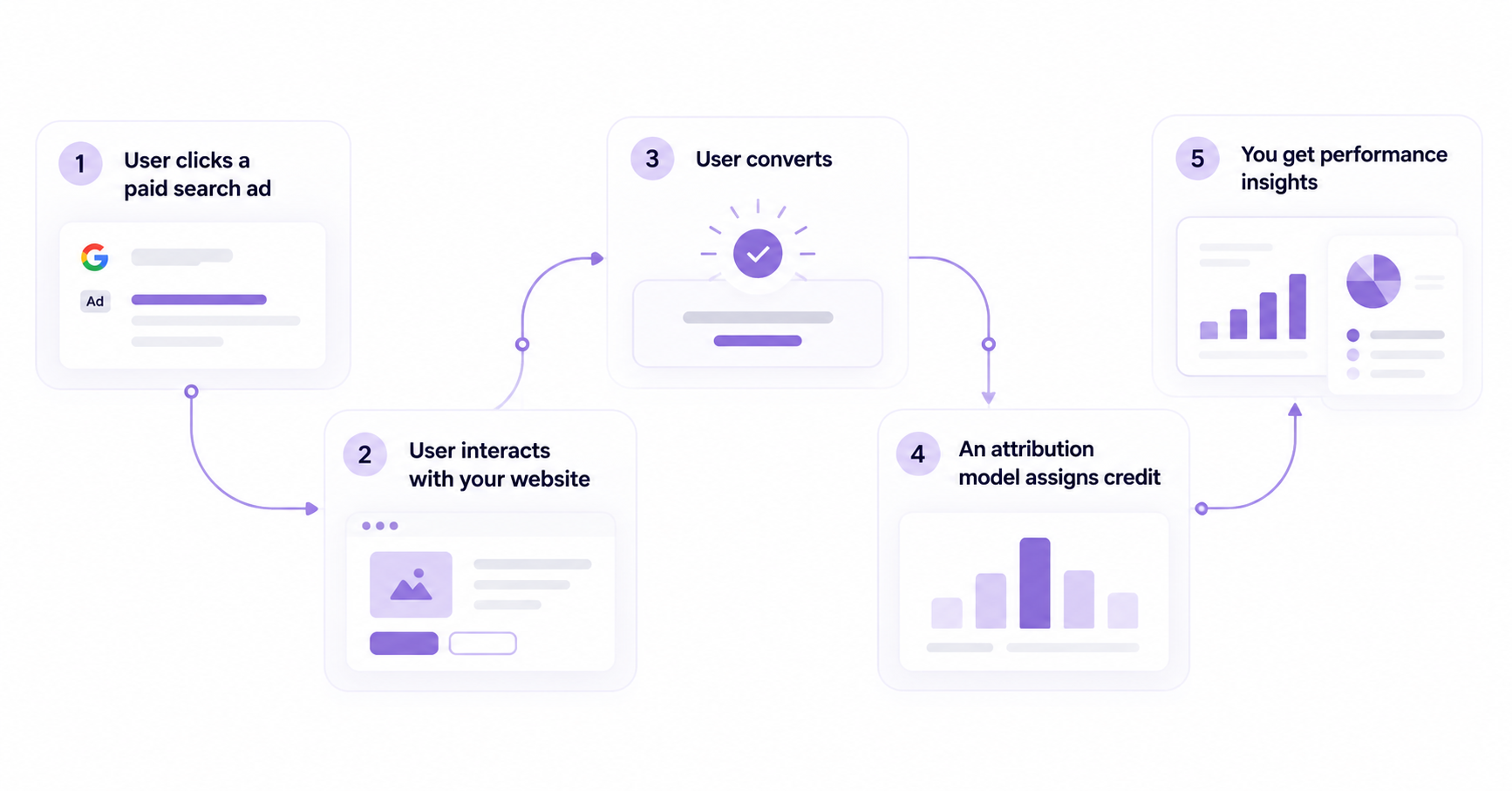
Step 1. Someone clicks your paid search ad
A potential customer searches for a product or service on Google or Bing and clicks your ad.
The advertising platform can associate the click with campaign information, such as the keyword, ad group, and campaign. Depending on your tracking setup, identifiers such as Google’s GCLID or campaign UTM parameters can help connect the visit to its advertising source.
Step 2. The visitor interacts with your website
After clicking the ad, the visitor might explore product pages, read a blog post, compare pricing, or leave without converting.
Website tracking and customer journey analytics can help record these interactions and show how visitors move through your website.
Not every interaction will necessarily be captured. Tracking coverage depends on your implementation, privacy settings, and available identifiers.
Step 3. A conversion is recorded
A conversion happens when someone completes an action you’ve defined as valuable.
For example:
- An ecommerce customer completes a purchase.
- A SaaS prospect requests a demo.
- A visitor submits a lead generation form.
- An existing prospect signs up for a paid plan.
Accurate conversion tracking is essential because attribution needs a recorded outcome to assign credit to.
Step 4. An attribution model assigns credit
Once a conversion is recorded, the attribution model determines how credit is distributed across eligible marketing interactions.
A last-touch model credits the final eligible interaction, while a multi-touch model can distribute credit across several recorded touchpoints.
The results depend on the model, the attribution window, and which interactions the measurement system can observe.
Step 5. Marketers analyze the results
Finally, attribution reports help marketers evaluate how paid search contributes to conversions and other business outcomes.
For example, you might discover that:
- Non-branded search campaigns frequently introduce new prospects.
- Branded search campaigns often appear closer to conversion.
- Some campaigns generate leads but contribute little qualified pipeline.
- Paid search assists conversions that are eventually completed through other channels.
These findings can help you evaluate campaign performance, investigate underperforming campaigns, and make more informed budget decisions.
The key distinction: Conversion tracking records that an action happened. Paid search attribution helps determine which recorded advertising interactions receive credit for that action.
Maximize your ROI
with accurate attribution
Paid search attribution example
Let’s say a B2B SaaS company is running Google Ads to generate demo requests.
A potential customer discovers the company through a non-branded search ad, but doesn’t convert immediately.
Over the next two weeks, they interact with the business several times:
- Day 1 — Google search ad: They search for “project management software” and click a paid search ad.
- Day 4 — Organic search: They return through Google to read a product comparison article.
- Day 9 — LinkedIn ad: They click a retargeting ad and explore the product’s features.
- Day 14 — Branded search ad: They search for the company’s name, click another Google ad, and request a demo.
The company records one demo request, but four marketing interactions contributed to the recorded journey.
How different attribution models assign credit
Assuming all four touchpoints are eligible and recorded, here’s how three common models would distribute credit for that demo request.
| Marketing touchpoint | First-touch | Last-touch | Linear |
|---|---|---|---|
| Non-branded Google search ad | 100% | 0% | 25% |
| Organic search | 0% | 0% | 25% |
| LinkedIn ad | 0% | 0% | 25% |
| Branded Google search ad | 0% | 100% | 25% |
What does this tell us about paid search performance?
Under last-touch attribution, the branded search campaign receives all the credit. That could make it look like the strongest-performing campaign.
But first-touch attribution tells a different story. The non-branded search campaign introduced the prospect to the company.
Linear attribution recognizes both paid search interactions, along with the organic search and LinkedIn touchpoints.
Neither view automatically proves which campaign caused the conversion. Instead, each model provides a different way to evaluate the recorded customer journey.
This distinction becomes particularly important when measuring cross-channel marketing attribution.
For a business with a longer sales cycle, the demo request may also be only the beginning. Connecting the journey with CRM outcomes through marketing attribution and CRM integration can help determine whether the prospect eventually becomes a qualified opportunity or paying customer.
The takeaway: Paid search attribution isn’t simply about identifying the last ad someone clicked. It’s about understanding the role paid search plays throughout the customer journey and using that information to evaluate marketing performance.
Types of paid search attribution models
Different attribution models assign conversion credit differently. Choosing the right model helps you understand how paid search contributes at various stages of the customer journey.
| Attribution model | How it works | Best for |
|---|---|---|
| First-touch | Gives 100% credit to the first recorded interaction. | Identifying campaigns that introduce customers. |
| Last-touch | Gives 100% credit to the final recorded interaction. | Understanding conversion-stage activity. |
| Linear | Distributes credit equally across eligible touchpoints. | Evaluating the broader customer journey. |
| Time-decay | Gives more credit to interactions closer to conversion. | Assessing later-stage engagement. |
| U-shaped | Typically gives 40% each to the first and last touchpoints, with 20% shared between middle interactions. | Recognizing discovery and conversion. |
| Data-driven | Uses statistical modeling to distribute credit based on available interaction and conversion data. | Evaluating contributions using observed patterns. |
Not sure which one fits your sales cycle? This walkthrough on how to choose an attribution model covers the trade-offs.
Which attribution models does Google Ads support?
Google Ads currently offers data-driven and last-click attribution for eligible conversion actions. First-click, linear, time-decay, and position-based models were discontinued as selectable options in 2023.
Other marketing attribution models can be used in cross-channel attribution platforms, depending on their capabilities.
Remember: No attribution model proves exactly what caused a conversion. Each provides a different interpretation of recorded marketing interactions.
How to set up paid search attribution tracking
Setting up paid search attribution involves more than tracking ad clicks. You need to capture conversions, identify where visitors came from, and connect those interactions to meaningful business outcomes.
Here’s how to get started.
Step 1. Define your conversion goals
Identify the actions that matter to your business, such as purchases, demo requests, signups, or qualified leads. If you haven’t formalized them yet, start with setting up conversion goals.
For B2B companies, consider tracking opportunities and closed deals alongside initial lead conversions.
Step 2. Configure conversion tracking
Set up conversion tracking in Google Ads or Microsoft Advertising to record valuable actions.
Make sure events fire correctly, conversion values are accurate, and the same action isn’t counted multiple times unintentionally.
Step 3. Track campaign sources
Enable Google Ads auto-tagging where appropriate and use consistent UTM parameters to identify campaign traffic in your analytics tools.
Tracking parameters help connect website visits with the campaigns that generated them.
Step 4. Connect customer interactions
Use customer journey analytics to examine recorded interactions across visits and marketing channels. If you’re starting from scratch, it helps to know how to track the customer journey end to end.
This helps you understand whether paid search introduces visitors, brings them back, or appears closer to conversion.
Step 5. Connect conversions with revenue
If you have a longer sales cycle, connect your CRM and conversion data where supported.
This allows you to evaluate paid search performance using qualified leads, pipeline, and revenue rather than form submissions alone.
Step 6. Validate your attribution reports
Check that conversions, campaign sources, and tracking identifiers are recorded correctly.
Compare reports using consistent date ranges, conversion definitions, and attribution settings. Investigate discrepancies between tools before making major budget decisions.
Remember: Attribution quality depends on the data available. Even a well-configured tracking setup may not capture every customer interaction.
Common paid search attribution challenges and how to fix them
Even with conversion tracking in place, paid search attribution isn’t always straightforward. Missing interactions, inconsistent reporting, and longer buying journeys can make it difficult to understand which campaigns contribute to conversions.
Here are the most common challenges and how to address them.
| Challenge | Why it happens | How to address it |
|---|---|---|
| Incomplete tracking | Consent choices, browser restrictions, and tracking gaps can limit recorded interactions. | Audit your tracking setup, validate events, and use supported server-side tracking methods where appropriate. |
| Cross-device journeys | Customers may research on mobile and convert on desktop. | Use appropriate authenticated identifiers where available, while respecting privacy requirements. |
| Overvalued branded search | Last-touch reporting can give branded campaigns credit for conversions influenced by earlier interactions, a pattern known as attribution bias. | Compare attribution models and examine earlier marketing touchpoints. |
| Different conversion numbers | Google Ads, GA4, and CRM reports may use different attribution windows, definitions, and reporting dates, which is a common source of ad platform discrepancies. | Align reporting settings and investigate discrepancies before comparing results. |
| Long sales cycles | A lead in a B2B sales funnel might convert into a paying customer weeks or months after clicking an ad. | Connect advertising interactions with CRM opportunities and closed revenue where possible. |
| Disconnected marketing data | Paid search, organic, email, and CRM data often live in separate systems, so there’s no single source of truth. | Use multi-touch attribution to analyze eligible recorded interactions across connected channels. |
How can you improve attribution accuracy?
Start by making sure your conversion tracking is reliable. Then review campaign tagging, conversion definitions, attribution windows, and CRM data connections.
It’s also important to recognize that attribution cannot capture every customer interaction or prove exactly what caused a conversion. Use attribution findings alongside incrementality testing, customer research, and other performance data when making major investment decisions.
Key paid search attribution metrics to track
To measure paid search performance, look beyond conversion counts and focus on metrics that connect ad spend with customer acquisition and revenue.
| Metric | What it measures | Why it matters |
|---|---|---|
| Cost per click (CPC) | Average amount paid for each ad click. | Helps monitor traffic acquisition costs. |
| Conversion rate | Percentage of ad clicks or visits that result in a conversion, depending on the reporting definition. | Shows how effectively traffic converts. |
| Cost per acquisition (CPA) | Average advertising cost per recorded acquisition or conversion. | Helps evaluate conversion efficiency. |
| Return on ad spend (ROAS) | Revenue attributed to advertising divided by ad spend. | Shows attributed revenue relative to advertising costs. |
| Customer acquisition cost (CAC) | Total customer acquisition costs divided by new customers acquired. | Helps evaluate the cost of acquiring paying customers. |
| Attributed revenue | Revenue credited to paid search under a selected attribution model. | Connects campaign activity with revenue outcomes. |
| Conversion lag | Time between an advertising interaction and conversion. | Helps explain delayed conversions and reporting changes. |
Which metrics matter most?
The answer depends on your business model.
For ecommerce businesses, conversion rate, CPA, ROAS, and attributed revenue are particularly useful for evaluating paid search performance.
For B2B SaaS businesses, lead volume is only part of the picture. Qualified leads, sales opportunities, pipeline generated, CAC, and closed revenue can provide a better understanding of campaign value.
For example, one campaign might generate 100 leads at a low CPA, while another generates only 30 leads but contributes more qualified opportunities and revenue.
The second campaign may be more valuable despite its higher cost per lead.
This is why connecting paid search performance with pipeline attribution can be useful for businesses with longer sales cycles.
Remember: Attributed ROAS and revenue depend on the selected attribution model. They represent assigned credit, not necessarily incremental revenue caused by advertising.
How to improve paid search ROI using attribution
Paid search attribution becomes valuable when you use its findings to make better campaign decisions.
Rather than optimizing campaigns based only on clicks or last-touch conversions, examine how they contribute throughout the customer journey.
Here are five practical ways to use attribution insights.
1. Identify campaigns that introduce valuable customers
Non-branded search campaigns often reach people who are still exploring their options.
These campaigns may receive limited credit under last-touch attribution, even when they introduce prospects who convert later.
Compare first-touch and multi-touch reports to understand their contribution before reducing budgets.
2. Look beyond branded search conversions
Branded campaigns often capture visitors who already know your business.
If branded search receives most of the conversion credit, investigate which earlier campaigns and channels helped generate that demand.
This can help you avoid overvaluing the final interaction.
3. Optimize for lead quality, not just volume
A campaign generating inexpensive leads isn’t necessarily your most profitable campaign.
Connect paid search conversions with CRM outcomes where possible to understand which campaigns contribute to qualified opportunities and paying customers. Over time, this is one of the more reliable ways to reduce customer acquisition cost.
For businesses with longer sales cycles, this provides a more useful basis for evaluating campaign performance than cost per lead alone.
4. Find opportunities to improve conversion rates
Use funnel analysis to identify where visitors abandon important steps after clicking your ads.
For example, if paid search visitors frequently reach your demo form but rarely submit it, investigate the form experience, landing page messaging, and traffic relevance.
Test potential improvements rather than assuming the source of the problem.
5. Compare attribution results before reallocating spend
A campaign’s performance can look different under first-touch, last-touch, and multi-touch attribution.
Compare these perspectives alongside CPA, ROAS, conversion quality, and actual revenue before making major budget changes.
Attribution can highlight campaigns worth investigating, but it doesn’t prove what would happen if you increased or removed their budgets.
The goal isn’t to give every campaign more credit. It’s to understand which marketing activities contribute to valuable outcomes and use that evidence to make better investment decisions.
How Usermaven connects paid search to revenue
Paid search campaigns can generate clicks and leads, but understanding which ones contribute to actual revenue requires connecting advertising data with customer journeys and sales outcomes.
Usermaven is an AI-powered marketing attribution platform that brings together ad spend, customer interactions, conversions, pipeline, and revenue, helping you identify which paid search campaigns contribute to business growth.
Here’s how it helps you evaluate paid search performance beyond clicks and form submissions.
Understand paid search’s role in the customer journey
A prospect might first discover your business through a non-branded Google search ad, return through organic search, and eventually convert after clicking a branded campaign.
With user journeys, you can examine recorded interactions across these visits and understand where paid search appears in the conversion path.
This helps you investigate whether campaigns introduce prospects, bring them back, or contribute closer to conversion.
Compare attribution models across channels
Looking only at the last interaction can undervalue campaigns that contributed earlier in the journey.
Usermaven’s multi-touch attribution lets you compare attribution models and examine how recorded marketing touchpoints receive conversion credit.
For example, you can investigate whether non-branded search campaigns introduce customers who later convert through branded search, email, or other channels.
Connect ad spend with pipeline and revenue
Generating leads is useful, but not every lead becomes a customer.
By connecting supported advertising and CRM data, such as Google Ads and HubSpot, Usermaven helps you evaluate which marketing activities contribute to qualified opportunities and full-funnel revenue.
Instead of relying only on cost per lead, you can investigate how paid search contributes to customer acquisition and business outcomes.
Ask questions about campaign performance with Maven AI
Maven AI helps you explore your analytics data using natural-language questions.
For example, you could ask which paid search campaigns contributed to conversions during a particular period or investigate how different channels appear in customer journeys.
The available answers depend on your connected data and tracking setup.
The result: A more connected view of paid search performance, helping you evaluate campaigns based on their contribution to customer journeys and business outcomes rather than clicks alone.
Maximize your ROI
with accurate attribution
Final thoughts
Paid search attribution helps you understand how PPC campaigns contribute to conversions and revenue beyond the initial ad click.
With reliable tracking and the right attribution models, you can identify valuable marketing touchpoints and make smarter budget decisions.
Marketing attribution software like Usermaven helps connect paid search activity with customer journeys, pipeline, and revenue, giving you a clearer picture of what drives business growth.
Ready to see it in action? Explore the platform or book a demo for a closer look.
FAQs
1. How is paid search attribution different from conversion tracking?
Conversion tracking records when someone completes an action, such as a purchase or demo request. Paid search attribution determines which eligible advertising interactions receive credit for that conversion.
2. What attribution models does Google Ads support?
Google Ads supports data-driven and last-click attribution for eligible conversion actions. First-click, linear, time-decay, and position-based models were discontinued as selectable options in 2023.
3. Why do Google Ads and GA4 report different conversions?
Google Ads and GA4 can report different results because of differences in attribution settings, conversion definitions, reporting dates, and tracking methods. These differences don’t necessarily indicate a tracking error, but they’re worth understanding if you rely on GA4 for marketing attribution.
4. How do you track paid search attribution across multiple channels?
Track campaign sources, record conversions, and connect customer interactions across paid search, organic search, email, and other channels. Multi-channel attribution can help you evaluate how these recorded interactions contribute to conversions.
5. Can paid search attribution measure actual ROI?
Paid search attribution helps assign revenue credit to advertising interactions. When combined with campaign costs and revenue data, it supports ROI analysis. However, attributed revenue doesn’t necessarily represent the additional revenue caused by advertising.

Written by
Adeel Khan
Growth Marketing Expert
Adeel Khan is a full-stack SaaS marketer with 10+ years of experience in content marketing, paid advertising, analytics, and conversion rate optimization. He shares practical insights and strategies drawn from hands-on experience, helping B2B SaaS marketers improve performance and make better marketing decisions.
All articles by Adeel →