A user discovers your product, signs up, explores a few features, and leaves before completing onboarding. What went wrong, and how do you find out?
That’s where understanding user journey vs. user flow becomes important.
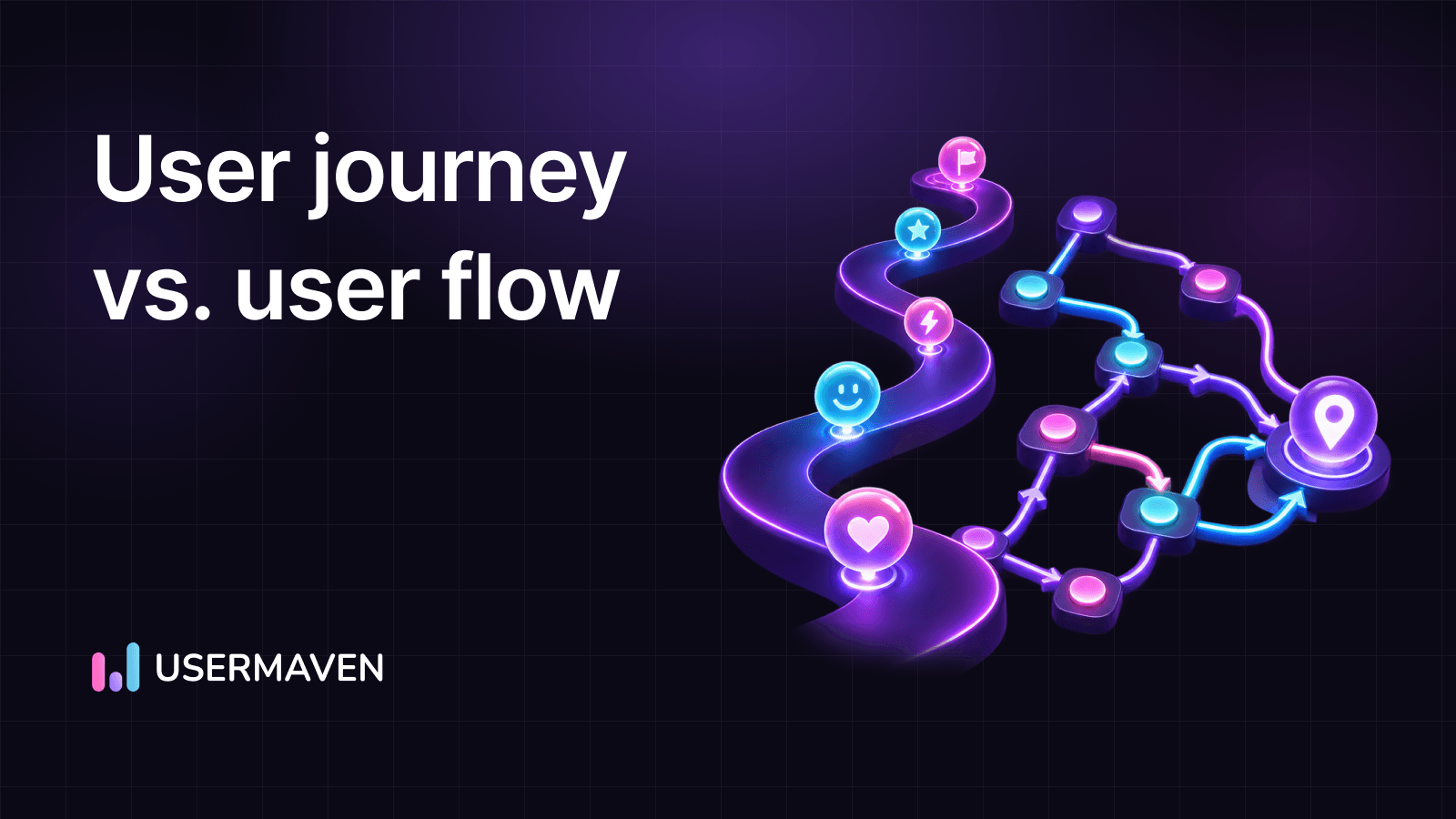
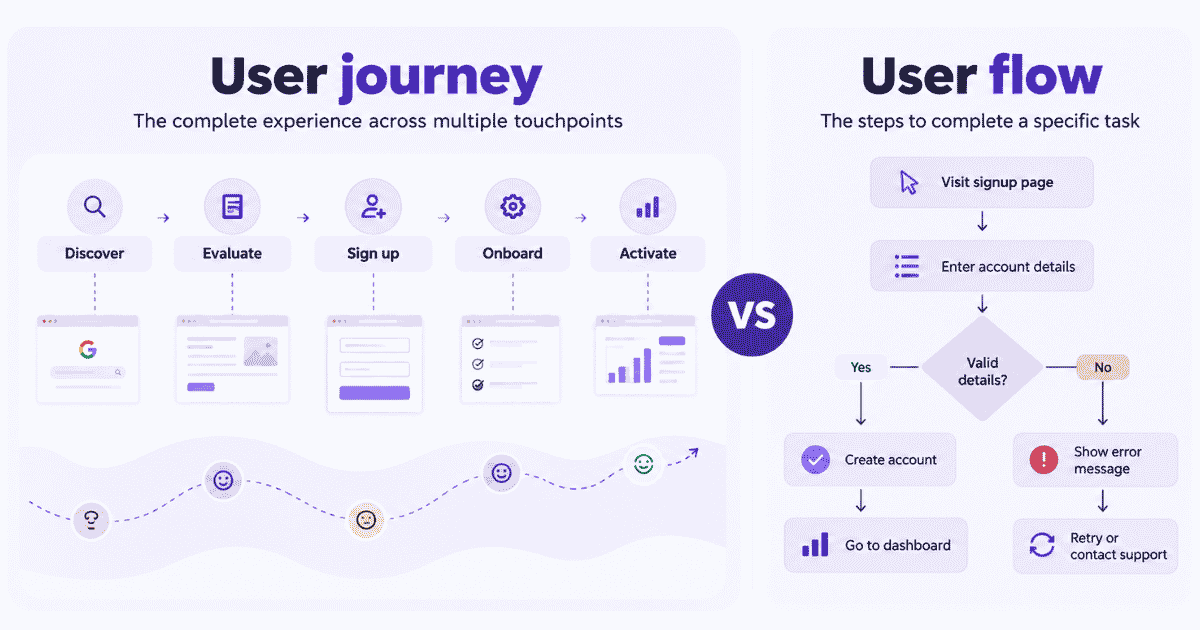
A user journey captures the complete experience across different touchpoints, while a user flow focuses on the specific steps someone takes to complete a task.
Both help you understand user behavior, identify friction, and improve the user experience. But knowing when to use each can make all the difference.
Visualize & optimize
user journeys with Usermaven
Key takeaways
- A user journey covers the complete experience across multiple touchpoints, while a user flow focuses on the steps needed to complete a specific task.
- User journey maps help identify customer goals, expectations, and pain points. User flow diagrams visualize actions, decisions, and navigation paths.
- Use user journeys to understand the broader customer experience and user flows to improve specific processes like signup, checkout, and onboarding.
- Combining both approaches helps teams identify friction, simplify interactions, and create smoother paths to conversion.
- Behavioral analytics tools like Usermaven help you analyze actual user journeys, identify funnel drop-offs, and understand how marketing touchpoints contribute to conversions.
What is a user journey?
A user journey is the sequence of experiences and interactions a person has with a product or service while working toward a goal. It considers the broader experience, from the first interaction to completing an action and beyond.
Unlike a single interaction or task, a user journey includes multiple touchpoints, channels, and stages. It helps businesses understand what users want to achieve, where they encounter difficulties, and how their experiences change over time.
For example, a SaaS user’s journey might include:
- Discovering the product through a Google search.
- Visiting the website and exploring its features.
- Comparing pricing and alternatives.
- Signing up for an account.
- Completing onboarding and using the product.
- Upgrading to a paid plan.
A user journey map visually organizes these stages, along with user goals, touchpoints, pain points, and opportunities for improvement.
Journey maps can also incorporate feedback from interviews, surveys, and usability testing to understand how users feel at different stages.
What is a user flow?
A user flow is a visual representation of the steps a user takes to complete a specific task within a website, app, or digital product. It shows how users move between screens, make decisions, and interact with different elements to reach a goal.
In UX design, user flows help teams plan navigation paths, identify unnecessary steps, and create a smoother user experience.
For example, a SaaS signup flow might look like this:
- Visit the signup page: A user clicks the signup button.
- Choose a signup method: They select Google sign-in or email registration.
- Enter account details: They complete the required fields.
- Verify their account: They confirm their email if verification is required.
- Reach the dashboard: They successfully create an account and begin onboarding.
A user flow diagram, also called a user flowchart, visualizes this process using shapes, arrows, and decision points. It can show alternative paths, such as what happens when someone enters incorrect information or abandons registration.
By mapping these interactions, UX designers and product teams can identify friction, simplify navigation, and improve task completion rates.
Once the flow is live, teams can use funnel analysis to measure how users progress through its stages and identify where they drop off.
User journey vs. user flow: Key differences
The main difference between a user journey and a user flow is their scope. A user journey examines the overall experience of achieving a goal, while a user flow focuses on the specific interactions needed to complete a task.
Both are important in UX design, but they help teams answer different questions.
| Aspect | User journey | User flow |
|---|---|---|
| Primary focus | Overall user experience | Specific task or interaction |
| Scope | Multiple stages, channels, and touchpoints | Individual screens, actions, and decisions |
| Main goal | Understand user needs, expectations, and pain points | Make task completion easier and more efficient |
| Perspective | Broader experience over time | Step-by-step navigation and interactions |
| Visualization | User journey map | User flow diagram or flowchart |
| Key elements | Stages, goals, touchpoints, pain points, and emotions | Entry points, screens, actions, decisions, and outcomes |
| Data sources | User research, feedback, and behavioral analytics | UX requirements, usability testing, and behavioral analytics |
| Common use cases | Customer onboarding, product adoption, customer experience | Signup, checkout, password reset, account upgrades |
| Teams involved | UX, product, marketing, and customer success | UX designers, product managers, and developers |
| Success measures | Customer satisfaction, activation, retention, and conversion | Task completion rate, drop-off rate, errors, and time on task |
The difference in practice
Imagine users are signing up for a SaaS product but aren’t becoming active customers.
A user journey map helps you examine the broader experience, including how users discovered the product, what convinced them to sign up, and what challenges they faced during onboarding.
A user flow diagram focuses on a specific process, such as the steps required to create an account or complete initial setup.
The journey helps you understand the experience surrounding the problem. The flow helps you examine the interactions within it.
Neither replaces the other. Together, they help teams understand user needs and improve the paths people take toward their goals.
Visualize & optimize
user journeys with Usermaven
User journey vs. user flow example
Imagine a B2B SaaS company notices that plenty of people sign up for its product, but only a small percentage complete onboarding.
To understand what’s happening, the product team creates a user journey map and a user flow diagram.
Example 1: Mapping the user journey
The team examines the entire experience, from discovering the product to becoming an active user.
| Journey stage | User action | Goal | Potential friction |
|---|---|---|---|
| Awareness | Discovers the product through Google | Find a solution to a problem | Unclear product positioning |
| Consideration | Explores features, pricing, and reviews | Decide whether the product fits | Missing information or confusing pricing |
| Signup | Creates an account | Start using the product | Too many required fields |
| Onboarding | Connects data and completes setup | Get the product working | Complicated setup instructions |
| Activation | Uses a core feature for the first time | Experience the product’s value | Unclear next steps |
This user journey map helps the team examine the broader experience and identify where expectations, communication, or product interactions may be creating friction.
For example, users might sign up expecting immediate results but discover that they need to complete several setup steps first.
Example 2: Mapping the user flow
Now the team focuses specifically on the onboarding process.
A simplified user flow diagram might look like this:
Signup completed → Welcome screen → Connect data source → Connection successful?
- Yes: Configure workspace → Complete setup → Access dashboard.
- No: Review error message → Retry connection or contact support.
Unlike the journey map, this flow shows the specific actions and decision points users encounter during onboarding.
The team might discover that the data connection process involves confusing instructions or that users don’t know what to do after an error.
What can the team learn from both?
The user journey reveals a potential gap between what customers expect and what they experience during onboarding.
The user flow helps the team examine the exact steps where that friction might occur.
By combining both perspectives with actual user behavior data, the team can investigate onboarding drop-offs, improve instructions, simplify unnecessary steps, and measure whether more users successfully complete setup.
- A time-based sequence of touchpoints: The journey typically starts with buyer awareness, moving through exploration, use, and advocacy, spanning weeks or months, with each touchpoint marking an important moment.
- Emotional peaks and valleys: Emotions significantly affect user interactions, from frustration to delight. Recognizing these emotional cues helps businesses address pain points.
- A multi-channel perspective: Users interact across multiple channels, like mobile apps, laptops, and customer support. Tracking these interactions offers a complete picture of the experience.
By focusing on these components, businesses can improve strategies and enhance user satisfaction throughout the journey.
When should you use a user journey or user flow?
Choosing between a user journey and a user flow depends on what you’re trying to understand or improve.
If you’re investigating the overall customer experience, start with a user journey. If you’re trying to improve how someone completes a specific task, a user flow is usually more useful.
Use a user journey when you need to understand the bigger picture
A user journey is useful when you want to understand how different interactions influence the customer experience over time.
Consider using user journey mapping when you want to:
- Improve customer onboarding: Understand the experience from signup to activation and identify barriers to reaching value.
- Investigate customer churn: Explore where expectations aren’t being met or customers encounter recurring difficulties.
- Understand customer touchpoints: Examine how users interact with your website, marketing campaigns, product, and support team.
- Improve product adoption: Identify challenges that prevent customers from discovering and using important features.
- Align different teams: Give marketing, product, sales, and customer success teams a shared understanding of the customer experience.
For example, if customers sign up but rarely become active users, a journey map can help you examine the entire experience rather than focusing only on the signup process.
Use a user flow when you need to improve a specific task
A user flow is more useful when you want to understand how people navigate a particular process and what might prevent them from completing it.
Consider creating a user flow diagram when you want to:
- Optimize signup forms: Reduce unnecessary fields and simplify account creation.
- Improve checkout flows: Identify confusing steps or decisions that may contribute to cart abandonment.
- Simplify product onboarding: Make setup instructions and navigation easier to follow.
- Design new features: Plan how users will interact with screens, buttons, and decision points.
- Improve task completion: Identify unnecessary steps, navigation problems, or unclear error messages.
For example, if users frequently abandon a registration form, a user flow can help you examine the steps and alternative paths involved in completing registration.
When should you use both?
Use both when a problem involves the broader customer experience and a specific interaction within it.
For example, if customers struggle to activate their accounts, a journey map can help you understand the experience leading up to activation. A user flow can then help you examine the setup process in detail.
You can combine these methods with user behavior analytics to compare your assumptions with actual interactions and identify areas that deserve further investigation.
How user journeys and user flows work together
User journeys and user flows work best when you use them together. One helps you understand the broader customer experience, while the other helps you improve the interactions within it.
Here’s how to combine them in practice.
1. Map the overall user journey
Start by identifying the stages users go through to achieve their goals. Include important touchpoints, user expectations, and potential pain points.
Use customer feedback, interviews, and behavioral data to understand the experience rather than relying entirely on assumptions.
2. Identify a journey stage that needs improvement
Look for stages where users struggle, abandon the process, or fail to reach an important milestone.
For example, you might discover that many new customers create an account but never complete the initial setup.
3. Create a user flow for the specific task
Zoom in on the process causing friction. Map the screens, actions, and decision points involved in completing that task.
This helps you identify unnecessary steps, confusing navigation, or missing instructions.
4. Validate the flow with actual user behavior
A user flow diagram shows how a process is designed to work, but people don’t always follow the expected path.
Use customer journey analytics and conversion funnel data to investigate how users actually navigate your product and where they drop off.
Combine these findings with usability testing or customer feedback to better understand the reasons behind their behavior.
5. Improve the experience and measure the results
Use your findings to simplify the flow, improve instructions, or remove unnecessary steps.
After making changes, monitor task completion rates, conversion rates, and drop-offs to evaluate whether the experience has improved.
How Usermaven helps you understand real user journeys and improve conversion paths
You can design a user journey map or user flow diagram based on how you expect people to interact with your product. But what happens when users take a completely different path?
That’s where behavioral data becomes valuable.
Usermaven is an AI-powered marketing attribution platform that helps you understand how people discover your business, interact with your website or product, and move toward conversion.
Instead of relying only on assumptions, you can analyze real user interactions, identify friction, and make more informed decisions about improving the customer experience.
1. Understand the paths users actually take
A journey map shows the experience you’ve mapped out. But customers don’t always follow the same sequence of interactions.
With Usermaven’s user journeys, you can explore how people navigate your website or product, which pages and events they interact with, and the paths associated with conversions.
For example, you might discover that customers who book a demo often visit your integration pages before converting, while others return several times through different marketing channels.
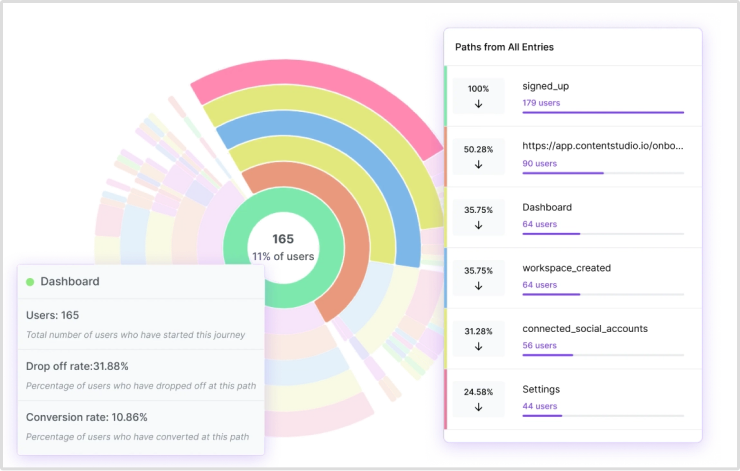
These insights help you:
- Identify common paths to conversion.
- Understand how different audience segments behave.
- Discover unexpected navigation patterns and potential friction points.
You can also explore the User Journeys documentation to learn how journey analysis works in Usermaven.
2. Find where users drop off before completing a task
A user flow diagram might show the ideal signup or onboarding process. But it won’t tell you how many people successfully complete each step.
Usermaven’s funnel analysis helps you measure progression through important conversion steps and identify where users abandon the process.
For example, imagine 1,000 users begin onboarding, but only 400 complete the initial setup.
You can investigate:
- Which onboarding steps have the highest drop-off rates.
- Whether certain user segments convert differently.
- How conversion rates change after improvements.
This helps your team prioritize the steps that deserve attention instead of redesigning the entire experience based on assumptions.
For setup instructions and additional capabilities, refer to Usermaven’s Funnels documentation.
3. Connect marketing touchpoints with conversions and revenue
A user’s experience often begins long before they reach your signup or checkout page.
Someone might discover your business through organic search, return through a LinkedIn campaign, read a comparison article, and eventually book a demo.
With Usermaven’s multi-touch attribution, you can analyze how different marketing channels and touchpoints receive credit for conversions and revenue.
This helps you understand:
- Which channels introduce potential customers to your business.
- Which interactions contribute along the conversion journey.
- How attribution results differ across models.
Instead of evaluating each marketing channel in isolation, you can connect acquisition activity with business outcomes.
4. Investigate behavior changes with Maven AI
Finding a drop-off is useful. Understanding which changes deserve investigation is even more valuable.
With Maven AI, you can ask questions about your marketing and product data in natural language and explore trends without manually reviewing multiple reports.
For example, you could ask:
“Compare our signup-to-activation funnel over the last 30 days with the previous period. Identify the stages with the biggest changes in conversion rates and highlight differences between new and returning users.”
Maven AI Agents can also run scheduled analyses for recurring tasks, such as conversion funnel checks, feature adoption reviews, and retention monitoring.
This helps teams identify changes sooner and spend more time deciding what to improve.
In summary
Understanding the difference between a user journey and a user flow helps you improve the customer experience from two perspectives.
A user journey gives you the bigger picture, while a user flow helps you improve the steps people take to complete specific tasks. Together, they help you identify friction, simplify interactions, and create better paths to conversion.
But mapping the experience is only the beginning. You also need to understand how users actually behave.
With Usermaven, you can analyze customer journeys, identify funnel drop-offs, and connect marketing touchpoints with conversions and revenue.
Book a demo to explore how Usermaven can help you turn user behavior insights into better business decisions.
Visualize & optimize
user journeys with Usermaven
FAQs
Is a user journey the same as a user flow?
No. A user journey covers the broader experience across multiple touchpoints, while a user flow focuses on the steps and decisions involved in completing a specific task. Both are used in UX design but serve different purposes.
What is the difference between a user journey map and a user flow diagram?
A user journey map visualizes the stages, goals, touchpoints, and pain points of an experience. A user flow diagram shows the screens, actions, and decision points involved in completing a task within a website or application.
Can a user journey include multiple user flows?
Yes. A single user journey can include several user flows, such as account registration, onboarding, checkout, and subscription upgrades. Each flow represents a specific task within the broader experience.
Should you create a user journey or a user flow first?
Start with a user journey when you need to understand the overall experience. If you’re designing or improving a specific task, you can start with a user flow. For broader UX improvements, mapping the journey first can help you identify which flows need attention.
What tools can you use to analyze user journeys and user flows?
Journey mapping and flowchart tools help teams visualize planned experiences and interactions. Behavioral analytics tools like Usermaven help analyze actual navigation paths, conversion funnels, and drop-offs to understand how those experiences perform.
How do user journeys and user flows help improve conversion rates?
User journeys help identify friction across the overall customer experience, while user flows help teams simplify specific conversion processes. Combining both with behavioral analytics and usability testing can help businesses prioritize improvements and measure their results.

Written by
Imrana Essa
SaaS Marketing Lead
Imrana Essa is a marketing lead and content strategist with 8+ years of experience creating and leading content for B2B and SaaS brands. She specializes in marketing analytics, attribution, content strategy, and organic growth, translating complex marketing concepts into clear, actionable insights. Her work focuses on helping marketers understand performance, make data-informed decisions, and build strategies that contribute to sustainable growth.
All articles by Imrana →