Search ads can bring in clicks fast. Knowing which ones are worth paying for is the harder part.
Most ad platforms give you plenty of data. Impressions. Clicks. CPC. Conversions. But data alone does not tell you what is driving returns.
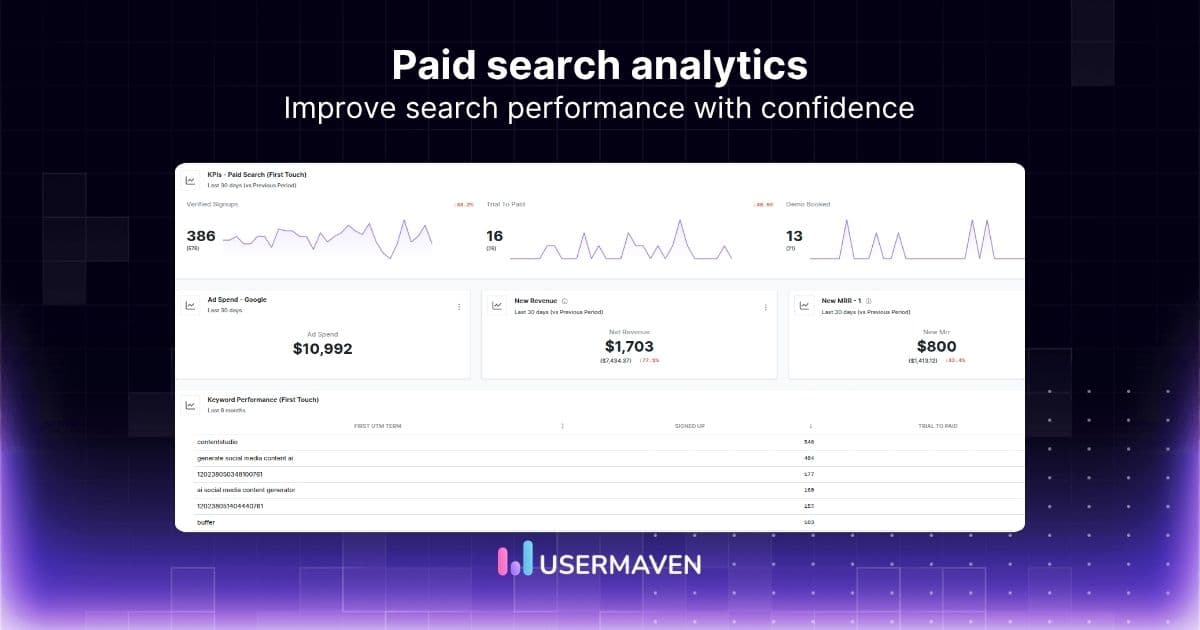
You still need to see what is working. Which campaigns deserve more budget? Which keywords are wasting spend? Which search terms are leading nowhere?
That is what paid search analytics is for. It helps you read performance with more clarity, so you can make better decisions and improve ROI over time.
In this article, you’ll learn what paid search analytics is, which metrics matter most, and which tools can help you get more from your search campaigns.
What is paid search analytics?
Paid search analytics is the process of tracking and interpreting data from search ad campaigns.
It helps you understand how your ads are performing, where your budget is going, and what is driving results from paid search traffic.
That includes the basics, like clicks, impressions, and cost per click. But it also goes further.
A good analysis shows which campaigns bring qualified traffic. Which keywords lead to conversions? Which search terms waste spend?
When done well, paid search analytics helps you answer questions like:
- Which campaigns are driving valuable traffic?
- Which keywords are too expensive for the return?
- Which search queries should be paused, refined, or scaled?
- Where is the budget being spent without results?
The goal is simple. Spend less time guessing and more time making decisions that move ROI in the right direction.
Paid search analytics vs. organic traffic analytics
Paid search analytics and organic traffic analytics both look at search performance. But they measure different things.
Paid search analytics focuses on ad-driven visits, spend, and conversions. Organic traffic analytics focuses on unpaid search visits and how content performs over time.
| Paid search analytics | Organic traffic analytics |
|---|---|
| Tracks paid search traffic from ads | Tracks traffic from unpaid search results |
| Focuses on spend, clicks, CPC, and conversions | Focuses on rankings, landing pages, engagement, and conversions |
| Measures campaign, keyword, and search term performance | Measures content, page, and search visibility performance |
| Helps improve campaign performance faster | Helps grow search visibility over time |
Also read: How to increase organic traffic
Why is paid search analytics important
The value of paid search analytics shows up in the decisions it makes easier. Here is how it looks in practice:
- It shows which keywords bring qualified traffic, not just volume. Good paid search analysis helps you look past clicks and focus on the terms that lead to signups, sales, or pipeline.
- It shows where spend is being wasted. With better keyword monitoring and search term data, you can spot low-intent queries early and avoid pouring resources into traffic that does not convert.
- It connects ad spend to revenue, not just activity. You can see which campaigns influence leads, sales, or pipeline instead of stopping at top-line numbers.
- It makes paid search optimization more precise. Once you know which campaigns, keywords, and queries are actually working, it gets easier to improve ROI with paid search and keep optimizing your marketing budget around real return.
- It helps you catch post-click problems faster. Search ad analytics can show when the ad is doing its job but the landing page is not, which gives you a clearer path to improve campaign performance.
- It gives you a better view across platforms. When you compare search ad analytics across Google Ads and Microsoft Ads, you can see where costs, intent, and returns differ and make smarter budget decisions.
Maximize your ROI
with accurate attribution
*No credit card required
Essential paid search metrics to track
A search ad account can show you a lot of numbers. Not all of them deserve equal attention.
Here are the metrics worth paying attention to:
- Impressions tell you how often your ads are showing. Useful for spotting reach, but not enough on their own.
- Click-through rate (CTR) shows how often people click after seeing your ad. A strong CTR usually means your keyword, ad copy, and intent are lining up well.
- Cost per click (CPC) tells you what each visit costs. This is one of the first numbers to watch when you want tighter control over spend.
- Quality Score helps explain how relevant your keywords, ads, and landing pages are. It is not the final goal, but it can affect both visibility and cost.
- Conversion rate shows how often paid search traffic turns into a desired action. This is where click volume starts becoming useful.
- Cost per acquisition (CPA) tells you how much you are paying for each conversion. A campaign with cheap clicks can still be expensive if it does not convert well.
- Search terms show the actual queries people typed before clicking. This is one of the most useful reports for finding wasted spend and improving targeting.
- Return on ad spend (ROAS) shows how much revenue you are getting back from ad spend. When revenue tracking is in place, this becomes one of the easiest ways to judge performance.
- Revenue or pipeline influenced gives you the bigger picture. It helps you see whether your paid search efforts are creating real business value, not just conversions on a dashboard.
💡 Quick note: If you want a cleaner way to review query-level visibility and click data, a Google Search Console dashboard can be useful alongside your core reporting.
Top 5 paid search analytics tools to consider
The right paid search analytics tool depends on what you want to improve. Some tools help you connect clicks to pipeline and revenue, while others are better for keyword research, competitor insights, or client reporting.
Let’s look at the best tools to help you get the most out of your ad spend.
1. Usermaven
Usermaven is an AI-powered analytics and marketing attribution platform built to help teams understand which campaigns, channels, and touchpoints actually drive conversions and revenue. For paid search analytics, it gives you a clearer view of what happens after the click, so you can connect paid search traffic to funnel movement, pipeline, and ROI.
It is especially useful when paid search is only one part of a longer journey. Instead of treating Google Ads or Microsoft Ads as isolated campaign reports, Usermaven helps you see how paid search assists, influences, or closes conversions across the full customer path.
Key capabilities include:
- Multi-touch attribution across marketing channels
- Paid ads attribution and campaign performance visibility
- Revenue attribution tied to conversions and customer journeys
- Funnel and conversion path analysis
- User journeys across the full customer path
- Landing page and post-click behavior insights
- Real-time dashboards for faster performance visibility
2. Google Analytics
Google Analytics helps marketers understand what paid search visitors do after they land on the site. It is useful for reviewing paid search traffic, landing page behavior, engagement trends, and conversion activity in one place.
Its strength lies in website behavior analysis rather than full-funnel attribution, so it is often most useful when the goal is to understand post-click performance more clearly. That makes it a practical option for teams focused on traffic and on-site engagement first.
Key capabilities include:
- Traffic acquisition reporting
- Landing page and engagement analysis
- Conversion reporting
- Campaign traffic visibility
3. Semrush
Semrush is a search marketing platform that helps marketers research paid keywords, analyze competitors, and plan PPC campaigns. It is especially useful for improving keyword strategy before and during campaign optimization.
Its strength in paid search analytics is upstream insight. Instead of focusing on attribution, it helps teams find keyword opportunities, organize PPC campaigns, and study competitor ad patterns.
Key capabilities include:
- PPC keyword research
- Competitor ad research
- PPC Keyword Tool
- Campaign planning support
4. SpyFu
SpyFu is a competitor intelligence tool focused heavily on PPC and keyword research. It helps marketers study which keywords competitors bid on, how their ad copy changes, and where they appear to be investing in search.
For paid search analytics, SpyFu is most useful when you want a competitive view of the market. It helps teams benchmark strategy, spot gaps, and refine search campaigns with stronger keyword and messaging insight.
Key capabilities include:
- PPC competitor keyword research
- Historical ad copy tracking
- Competitor ad spend insights
- Google Ads keyword analysis
5. AgencyAnalytics
AgencyAnalytics is a reporting platform built for agencies and teams that need to turn paid search data into clean dashboards and client reports. It is especially useful when campaign visibility matters, but reporting speed and clarity matter just as much.
Its value in paid search analytics is straightforward reporting. Rather than acting as a deep attribution platform, it helps consolidate campaign data into one place so teams can track performance and share results more efficiently.
Key capabilities include:
- Paid search dashboards
- Campaign and keyword reporting
- Automated reports
- Client-friendly reporting views
Best practices for paid search analytics
Once you know what to track and which tools to use, the next step is turning data into better performance.
These best practices keep your work grounded in search engine ads and tie directly back to ROI.

Set conversion goals that reflect real value
Not every conversion should be treated the same.
A form fill, a booked demo, and a closed deal can all matter. But they do not mean the same thing for the business.
A good starting point is simple:
- Define the actions that signal real buying intent
- Separate soft conversions from high-value conversions
- Report on both volume and quality
This is also where performance marketing attribution becomes more useful. Once your conversion goals are clear, it gets easier to see which campaigns are creating value and which ones are just generating clicks.
Review search terms alongside keyword targets
Keywords show what you bid on. Search terms show what people actually typed.
That gap matters. A campaign can look solid at the keyword level and still waste budget on irrelevant or low-intent queries.
This is one of the most useful habits in paid search analytics. It helps you spot wasted spend, tighten targeting, and improve ad performance with more confidence.
It also gives you clearer input for:
- Negative keywords
- Ad copy adjustments
- Landing page alignment
- Budget shifts between campaigns
Compare spend with what happens after the click
Cheap clicks can still lead nowhere.
A low CPC is helpful. But it does not mean much if the traffic does not engage, convert, or contribute to revenue. That is why paid ads analytics should go beyond the click.
Look at cost alongside bounce patterns, conversion rate, assisted conversions, and revenue influence. That gives you a clearer view of whether traffic is actually valuable.
This is also where attribution in advertising becomes more useful. It helps you judge performance with more context instead of reacting too quickly to surface-level numbers.
Use attribution to understand campaign influence
People rarely convert in one visit. They might click an ad, leave, come back from an email, return directly, and convert later. That is normal.
A reliable marketing attribution software helps you see which campaigns introduce demand, which ones keep people moving, and which ones help close the conversion.
A practical approach usually looks at:
- First-touch patterns
- Last-touch patterns
- Assisted conversions
- Conversion paths across channels
That gives paid search attribution more depth and makes it easier to avoid giving too much credit to the final click.
Use segmentation before making budget decisions
Blended averages can hide useful patterns.
Desktop traffic may convert well on one campaign. Mobile traffic may click more but drop off faster. Brand terms may look efficient, while non-brand terms do the harder work of generating new demand.
That is why segmentation matters.
Break performance down by device, match type, campaign intent, and audience behavior before moving budget around. This gives your paid search analysis more context and keeps optimization from becoming guesswork.
Mobile is a good example. If mobile traffic is valuable, your ads and landing pages need to support that intent. That can include faster pages, shorter forms, and mobile-preferred ad extensions, such as click-to-call, to make it easier for users to contact you directly from search results.
Look for trends before performance slips
Single data points can be misleading.
A jump in CPC or a dip in conversions does not always mean much on its own. Trends tell you more.
That is why it helps to track ad performance metrics over time. CTR, CPC, conversion rate, CPA, and return usually make more sense in motion.
This helps you catch:
- Rising costs before efficiency drops
- Lower-intent traffic before results weaken
- Search query drift before spend gets wasted
- Landing page issues before they hurt the account
Wrapping up
Paid search is only as effective as the data behind it. High click-through rates are a great start, but the real win is knowing which of those clicks actually lead to revenue.
This is where Usermaven serves as a powerful marketing attribution tool. It bridges the gap between your ad spend and final conversions, showing you the full journey from the first search to the moment a lead becomes a customer.
Ready to see exactly which keywords are driving your revenue and stop wasting budget on clicks that go nowhere?
Start a free trial or book a demo to get a clear, honest view of your paid search ROI with Usermaven
FAQs about paid search analytics
1. How can I track ROI effectively in paid search campaigns?
Track ROI by connecting ad spend to conversions, revenue, and customer value. The goal is to see which campaigns, keywords, and search queries generate profitable results, not just traffic.
2. How to set up conversion tracking for paid search campaigns?
Start by defining the actions that matter most, such as demo requests, purchases, or signups. Then make sure those conversions are tracked accurately so you can tie campaign spend back to real outcomes.
3. Why are search queries important in paid search analysis?
Search query data shows the actual terms people used before clicking your ads. That helps you find high-intent opportunities, improve keyword targeting, and filter out irrelevant traffic.
4. What is the difference between paid search analytics and paid ads analytics?
Paid search analytics focuses specifically on search engine ad campaigns. Paid ads analytics is broader and can include channels like paid social, display, and other advertising platforms.
5. How often should you review paid search analytics?
Review core campaign data regularly so you can catch performance shifts early. Frequent checks make it easier to adjust bids, keywords, budgets, and landing pages before wasted spend grows.
6. What makes a good paid search analytics tool?
A good tool should help you understand campaign performance, traffic quality, conversions, and ROI clearly. The more easily it connects clicks to outcomes, the more useful it becomes.
7. What are the best tools for paid search analytics?
Tools like Usermaven, Google Analytics, Semrush, SpyFu, and AgencyAnalytics can all support paid search analytics in different ways. Some help with attribution and post-click behavior, while others are better for keyword research, competitor analysis, or reporting.
Updated

Written by
Ryan Mitchell
Marketing Analytics Strategist
Ryan Mitchell is a marketing analytics strategist specializing in campaign measurement, customer journeys, and marketing performance. He writes about analytics, reporting, and data-driven marketing strategies, helping SaaS and B2B teams measure what matters across every stage of the customer journey.
All articles by Ryan →