Most teams look at pricing first because it sets the rules for everything that comes after: tracking scope, reporting cadence, and who can actually use the data.
Heap is a common pick for product analytics, so the key is understanding how its pricing plans are organized and how the model scales with real usage.
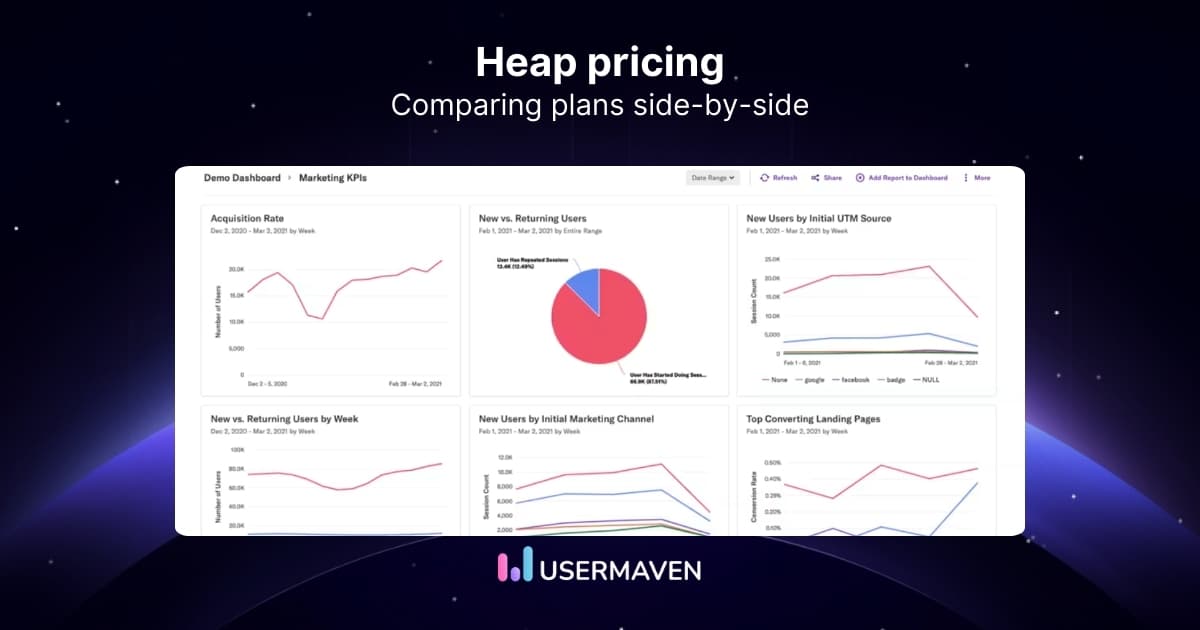
In this guide, we’ll break down Heap pricing, what usually affects the total cost, and when a Heap alternative is worth considering.
What is Heap?
Heap is a product analytics platform that tracks how people interact with a website or app. It collects user actions and turns them into reports, such as funnels and journeys. Teams use it to understand behavior, spot patterns, and monitor engagement over time.
Key features
- Event autocapture to track many user actions automatically.
- Custom events to define and group the actions you care about.
- Funnels and journey reports to see paths and drop-offs.
- Heatmaps and session replays to review on-page behavior and friction.
- Dashboards and visualizations for ongoing reporting and sharing insights.
Heap pricing breakdown
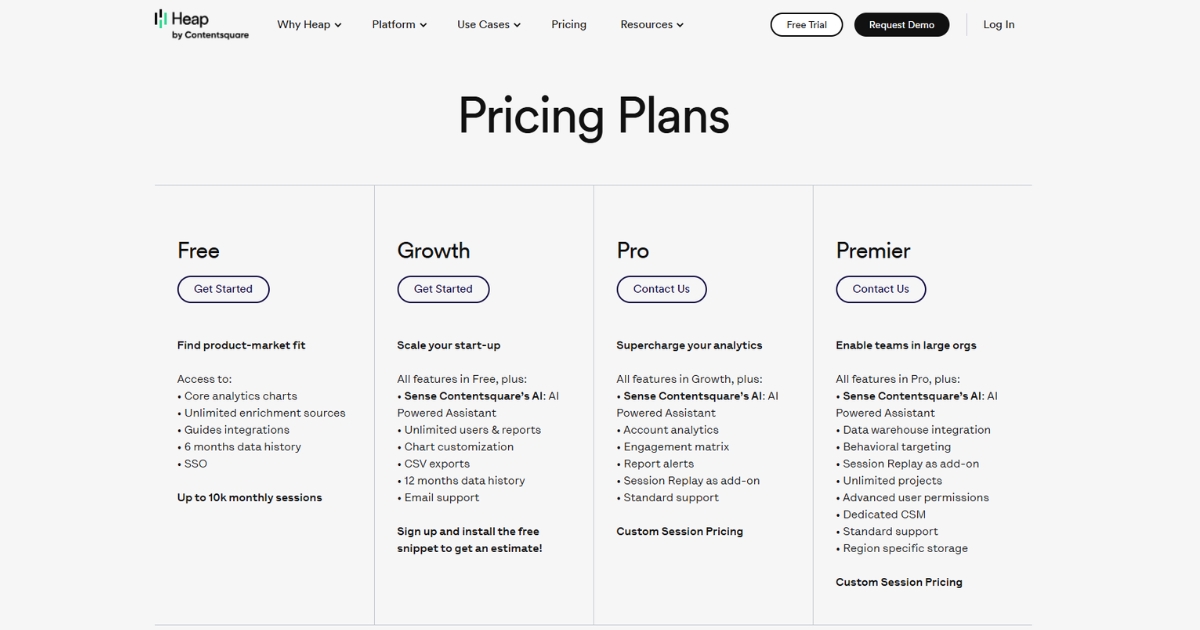
Heap pricing plans come in four tiers: Free, Growth, Pro, and Premier.
Here’s what each one covers, and where limits, add-ons, and tiered support start to shape the real Heap cost.
Free
The free plan is designed for getting started. It includes the core reports you need to explore the product, but it’s built around smaller volumes and a shorter lookback window. With caps on both monthly sessions and data history, you may run into limits before you’ve had enough time to validate trends and make confident decisions.
- Up to 10k monthly sessions
- Core analytics reports like charts, funnels, and journeys
- 6 months of data history, which limits longer-term trend work
- Shared and personal spaces for basic collaboration
Growth
Growth looks like the “real” starting point for a team because access opens up. But it still holds back a few operational basics, which is usually what triggers the next upgrade conversation.
- Unlimited users and reports
- 12 months of data history
- CSV exports and chart customization
- Email support
- No report alerts, even though alerts are a common need for teams monitoring key metrics
- Heap Connect is not available, so warehouse sync is not part of Growth
Pro
This is where Heap pricing becomes harder to evaluate from the pricing page alone. Pro uses custom session pricing, so you can’t estimate your total Heap cost without talking to sales.
It’s also where packaging starts to matter. Some things are included, others are add-ons, and the line between the two isn’t always obvious until you see a quote. That’s why “how much does Heap analytics cost” is tough to answer with a single number.
- Everything in Growth, plus account analytics and an engagement matrix
- Report alerts included
- Standard support is included, but higher support levels aren’t part of the base tier
- Heap Connect is an add-on here, so Heap Connect pricing becomes a separate decision
- Session replay is also shown as an add-on, depending on what you need
Premier
Premier is the top tier and also requires a sales quote. It bundles more of the enterprise setup, but the same issue remains: you won’t know the total cost until you go through the pricing conversation.
This is also the tier where support becomes more structured, with dedicated coverage and premium packages.
- Everything in Pro, plus advanced permissions and unlimited projects
- Data warehouse integration included
- Dedicated customer success manager
- Premium support packages are available, which reinforces that support is tiered
- Heap Connect is included at this level, rather than as an add-on like it is in Pro
Pros and cons
Heap covers a lot of ground, but the experience can vary depending on your team size, setup, and plan.
Here’s a look at where it tends to work well, and where teams often run into friction.
Pros
- Autocapture helps you get data in quickly
You can start collecting a wide range of user interactions without having to plan every event upfront. - Solid core product analytics reports
Funnels, journeys, retention, and dashboards cover the basics most teams need for behavioral reporting. - Good fit for teams that want room to expand later
Higher tiers add account-level analysis and more admin controls, supporting larger teams and more complex reporting.
Cons
- Pricing is harder to forecast for the tiers that most teams grow into
Once you get past the entry plans, you usually need a quote to understand the real Heap cost, which slows down budgeting and internal approvals. - Free plan limits can restrict real evaluation
Session caps and shorter data history can make it difficult to validate trends, compare time periods, or share reporting broadly. - Key workflow features aren’t consistent across tiers
Features such as report alerts and certain governance controls are available only on higher plans, so teams may encounter feature gaps as they mature. - Heap Connect isn’t broadly available
It’s not included in Free or Growth, appears as an add-on in Pro, and becomes standard only at the top tier. If warehouse syncing is part of your workflow, it can add an extra approval step or a separate budget line. - Support is tiered, which can limit help early on
Email support is available on Growth; standard support starts at Pro; and higher-touch support is reserved for top tiers or paid packages. That matters if your team needs hands-on onboarding or faster issue resolution. - Steep learning curve
Heap can take time to get used to, mainly because of the complexity of its advanced features. Teams often need extra ramp-up (and sometimes added support) before reports become consistent and easy to trust.
💡 Quick note: If you want a side-by-side view beyond pricing, our Heap vs. Mixpanel vs. Usermaven comparison breaks down how the tools differ in day-to-day reporting.
What users are saying about Heap
The most honest feedback on pricing shows up after a team has been using Heap for a while. That’s when usage settles, reporting becomes routine, and the “what are we paying for?” question gets clearer.
Overall, users tend to credit Heap with automatic tracking and the ability to build common reports such as funnels, retention, and journeys without much manual instrumentation.
Where feedback gets more cautious is the cost as usage grows. A recurring theme is that pricing can feel higher for smaller teams, and that session-based tiers can shift month to month as traffic changes.
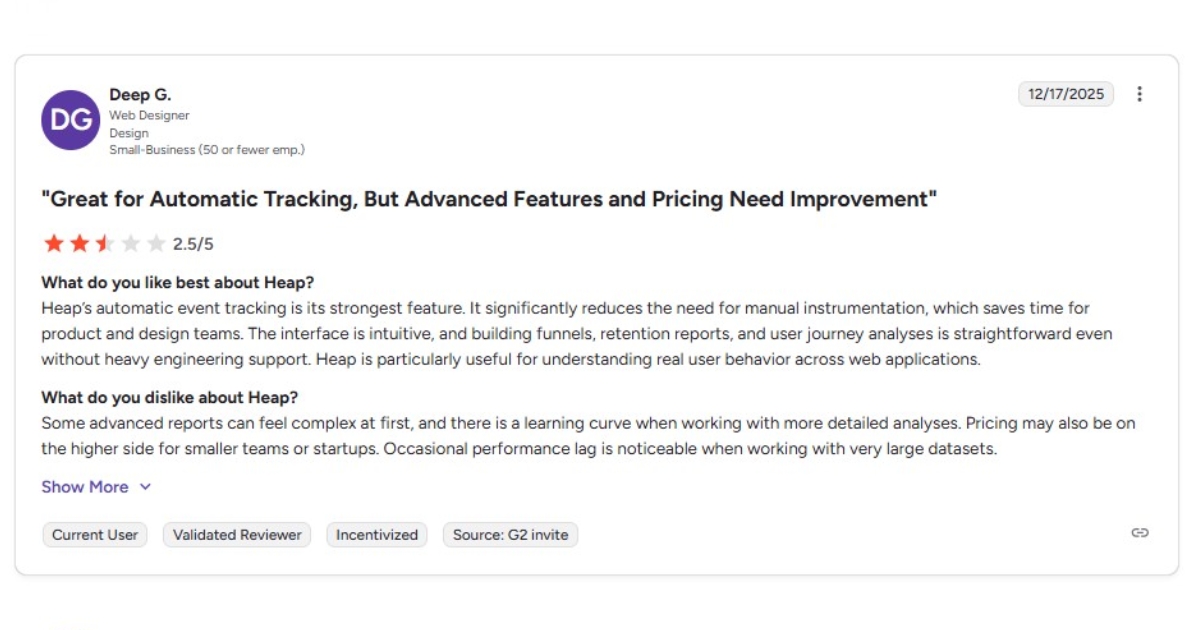
One user calls autocapture the strongest feature, but also notes that advanced reporting can feel complex at first. In the same review, they note that pricing may not feel comfortable for startups or small teams.
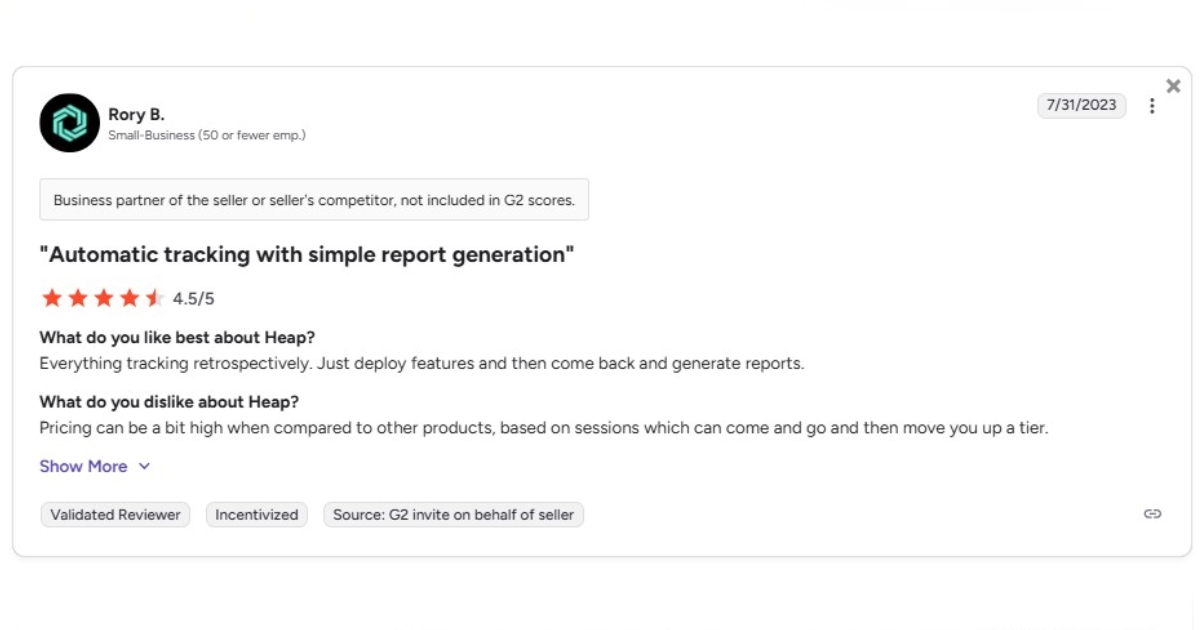
Another review describes the tracking as straightforward, but flags that pricing tied to sessions can move you into a higher tier when volume changes. That kind of variability makes it harder to budget with confidence.
Taken together, these reviews point to a fairly consistent experience. Heap is easy to get started with because tracking happens quickly, but pricing and advanced reporting tend to become bigger factors as usage increases and more stakeholders rely on the data. If long-term predictability matters, it’s worth comparing a few top Heap alternatives before you commit.
Note: Heap was acquired by Contentsquare, which may influence how plans are packaged and priced over time.
Why teams switch to Usermaven
Heap can work well, but the pricing and packaging model isn’t always easy to plan around once you move beyond the starter tiers.
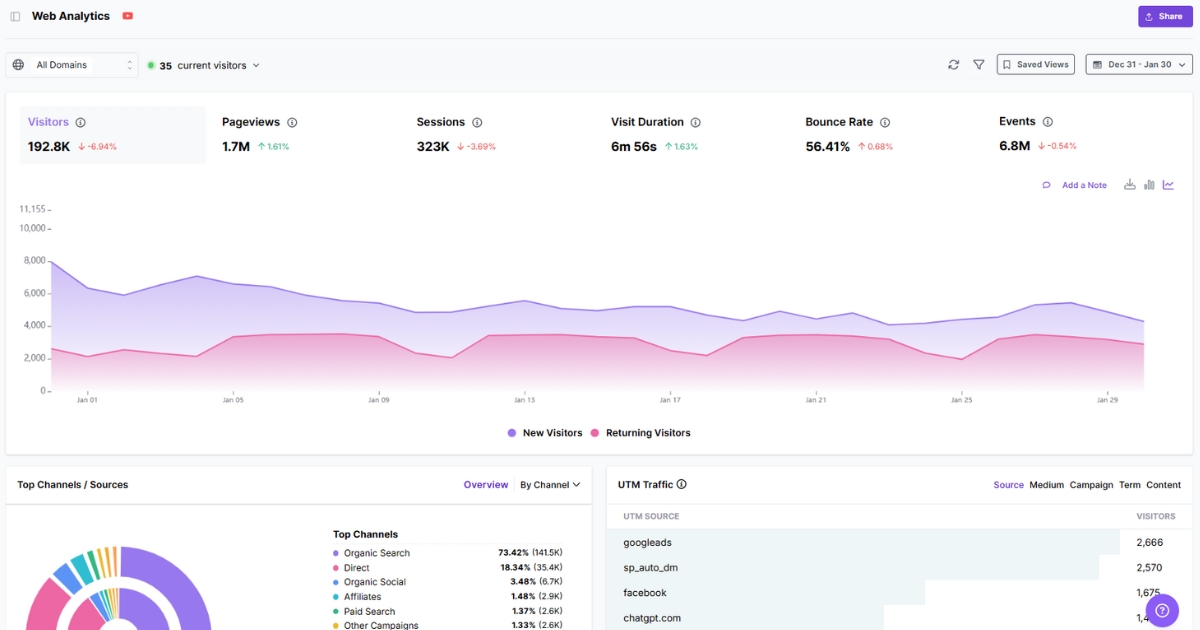
Usermaven keeps the focus on outcomes. It’s an AI-powered analytics and attribution tool built to connect the full story, from first visit to conversion. It’s designed for teams that want answers fast, without juggling separate tools for marketing reporting, product analytics, and multi-touch attribution.
Core analytics, attribution, and reporting are included up front, so you can evaluate fit without needing a separate quote just to clarify what’s in the plan.
Key features
- Attribution software to see which channels and touchpoints actually drive conversions, not just the last click
- Website analytics + product analytics together, so marketing and product teams can work from the same source of truth
- Automatic event tracking + custom events so you can measure key actions without manual setup
- Maven AI to ask questions in plain language and get charts, explanations, and next steps without digging through reports
- Funnels, journeys, and drop-off insights to find where users hesitate and what paths lead to conversion
- Conversion tracking and revenue attribution to connect signups, demos, and purchases back to the sources that drove them
- Dashboards and shareable reporting to keep weekly reporting consistent across stakeholders
- White label analytics so agencies and teams can present reporting under their own brand when sharing with clients or stakeholders
See Usermaven in action
Book a free demo and discover how powerful analytics can grow your business.
Usermaven pricing structure
With Usermaven, you don’t have to guess what a plan includes or how it scales. There are three options: Growth, Scale, and Enterprise, with prices shown upfront.
You can save 15% on yearly billing, and both Growth and Scale include a 14-day free trial.
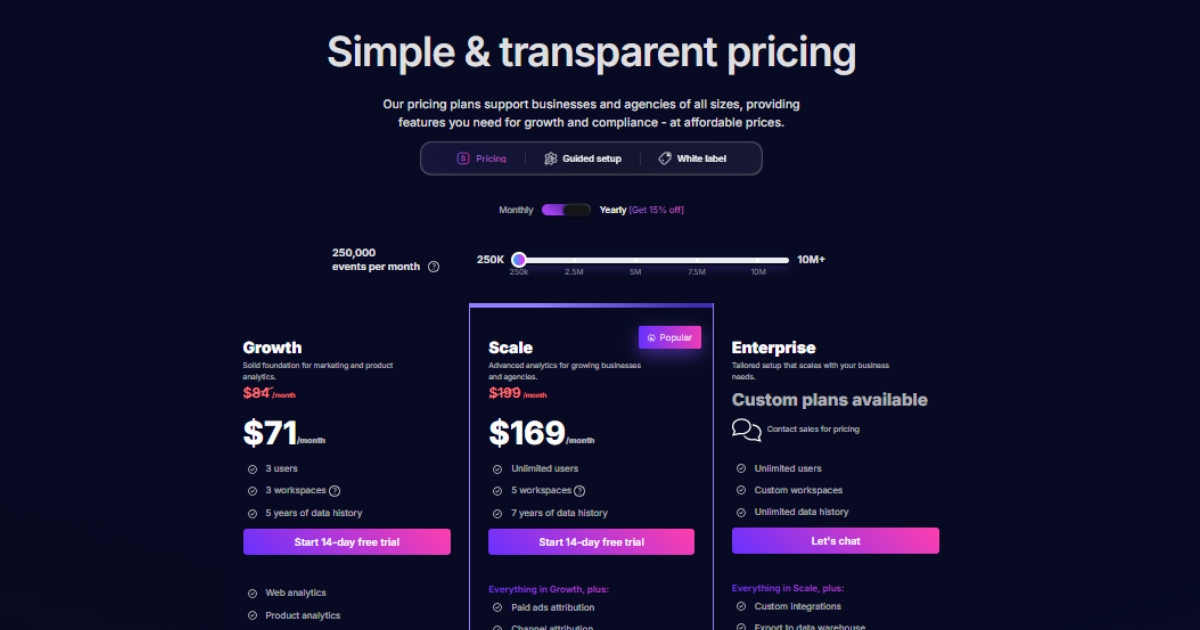
- Growth ($84/month)
Built for teams that want a reliable analytics foundation without extra setup work. It covers web and product analytics, funnels and user flows, dashboards, trends, and user and account profiles, with a long data history, so reporting remains consistent over time. - Scale ($199/month)
This is the plan for teams that need marketing attribution software, not just charts. It adds paid ads attribution, multi-channel attribution, and content attribution, plus conversion path analysis and CRM integrations. You also get Maven AI and ad platform coverage (Google, Meta, LinkedIn) to connect spend and campaigns to outcomes. - Enterprise (custom)
For larger organizations that need flexibility and control. It includes options such as custom integrations, data warehouse exports, advanced security and privacy, and higher-touch onboarding for larger rollouts.
If you want help setting it up properly, Usermaven also offers a guided setup and tracking plan as a one-time add-on ($499). You get expert guidance on what to track, implementation validation, and help getting dashboards and reports ready, so the team can start using the data quickly.
Usermaven vs. Heap pricing
Here’s a quick comparison table to make the differences clear at a glance.
| What you’re comparing | Usermaven | Heap |
| Price visibility | Growth/Scale priced upfront | Quote required on higher tiers |
| Cost predictability | Plan-based, easy to forecast | Depends on quote + packaging |
| What’s included | Core analytics available from the start | More core capabilities sit in higher tiers |
| Attribution | Attribution-first, built in | Not available |
| Support | Straightforward, guided setup available | Tiered, upgrades for more help |
| Learning curve | Faster to adopt across teams | Higher for advanced usage |
If you want a broader comparison set, take a quick look at HockeyStack alternatives and Cometly alternatives to see how other platforms approach analytics and reporting.
Wrapping up
Heap pricing can seem straightforward when you’re still in the early stages, and tracking is limited. The real test comes once it’s running in the background every day, usage climbs, and more teams start relying on the same numbers.
Usermaven keeps that part straightforward. Pricing is clear, core reporting is available upfront, and teams can connect analytics, attribution, funnels, and revenue outcomes without adding extra complexity just to keep things usable.
Ready to see Usermaven in action? Explore the platform or book a demo for a closer look.
FAQs
1. Is Heap worth it?
It can be, but it’s not always a quick “yes.” Heap has a learning curve, and since pricing on the higher tiers isn’t publicly listed, it’s smart to talk to sales early and confirm what your expected usage would cost before committing.
2. What are the disadvantages of Heap?
Cost can be harder to forecast on higher tiers; some capabilities depend on plan/add-ons, support is tiered, and advanced reporting can take time to learn.
3. Is Heap a CDP?
Not really. Heap is mainly a product analytics tool, not a full CDP built for identity resolution and data activation across channels.
4. What is a “session” in Heap pricing?
Heap defines a session as a period of activity from a single user, ending after inactivity (web and mobile have different inactivity windows).
5. What happens if I exceed my session limit?
Heap states it won’t drop or throttle data, but you may need to upgrade before you can continue viewing data.
6. Is Heap analytics pricing publicly available?
Heap publishes plan names and explains sessions, but detailed pricing for paid tiers generally requires contacting sales.
7. What is Heap Connect pricing?
Heap Connect is positioned as a data warehouse sync offering, described as an add-on for some tiers and included with Premier on Heap’s pricing page.
Updated

Written by
Ryan Mitchell
Marketing Analytics Strategist
Ryan Mitchell is a marketing analytics strategist specializing in campaign measurement, customer journeys, and marketing performance. He writes about analytics, reporting, and data-driven marketing strategies, helping SaaS and B2B teams measure what matters across every stage of the customer journey.
All articles by Ryan →